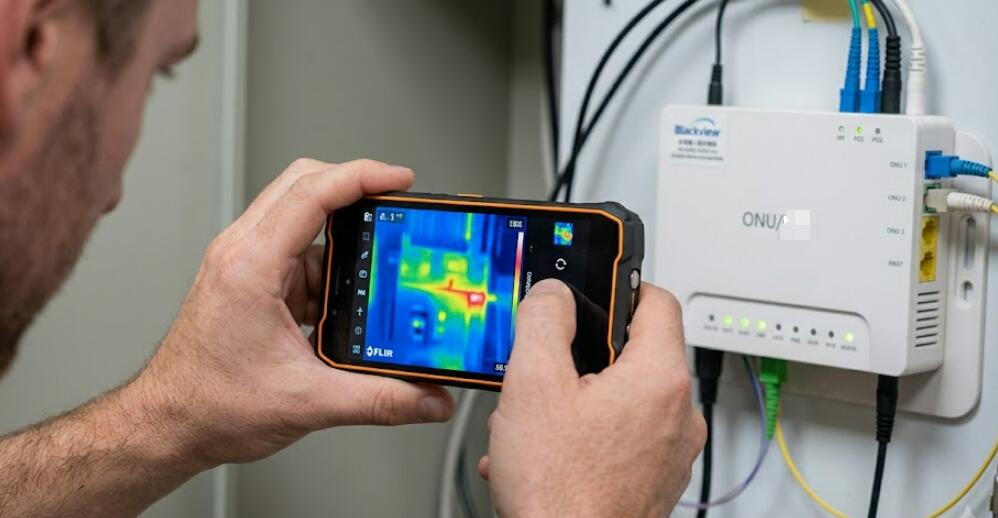
How to use a thermal imaging phone to quickly identify high-temperature areas caused by poor heat dissipation in an optical modem?
Welcome to Blackview (World's well-known brand of rugged smartphones and tablets) blog. Hope the guide helps.
An optical modem (also known as an ONT or ONU) is a critical device that provides high-speed fiber internet access for homes and businesses. Since it often operates continuously for 24 hours a day, it naturally generates heat during normal operation. However, if heat cannot dissipate efficiently due to dust accumulation, blocked ventilation, or hardware issues, certain internal components may become excessively hot. Prolonged overheating can reduce performance, shorten the lifespan of the modem, and even cause unexpected network interruptions. A thermal camera phone provides a quick and non-invasive way to identify abnormal temperature patterns before they develop into serious problems.
- Read also: How can I use a thermal phone to detect if bread has become moldy?
- How to quickly locate the heat source of an overheated TV box using a thermal phone?
- How to use a thermal phone to check if the smart lights are overheating?
Unlike traditional thermometers that only measure a single point, a thermal imaging phone creates a complete heat map of the modem's surface, allowing users to instantly locate hotspots and compare temperatures across different areas. This technology is useful for homeowners, IT technicians, and network installers who want to diagnose cooling problems without opening the device. By following the proper inspection procedure, users can safely determine whether poor ventilation, excessive workload, or possible hardware failure is responsible for abnormal heating.
Before beginning the inspection, place the optical modem in its normal operating environment and allow it to run for at least 20 to 30 minutes so that the internal temperature reaches a stable level. Ensure that the surrounding room temperature is relatively constant, avoid direct sunlight on the device, and remove any objects that may block airflow. These preparations help produce more accurate thermal images and make abnormal temperature differences easier to identify.
Why Monitor the Temperature of an Optical Modem?
Although optical modems are designed to operate within specific temperature ranges, continuous data transmission and limited ventilation can gradually increase internal temperatures. Regular thermal inspections help identify early warning signs before they affect network reliability.
Common Causes of Excessive Heat
Several factors may contribute to overheating in an optical modem.
- Dust blocking ventilation openings.
- Poor airflow due to enclosed installation spaces.
- Continuous high network traffic.
- Aging electronic components.
- Defective power adapters.
- Exposure to direct sunlight or nearby heat sources.
How to Inspect an Optical Modem Using a Thermal Imaging Phone
Follow these steps carefully to obtain reliable thermal images and accurately identify high-temperature areas caused by poor heat dissipation.
- Turn on the thermal imaging function on your phone.
- Allow the optical modem to operate normally for at least 20–30 minutes.
- Stand approximately 30 to 60 centimeters from the modem.
- Scan the front, rear, top, bottom, and both side panels slowly.
- Keep the camera perpendicular to the modem surface whenever possible.
- Observe the thermal color distribution across the entire device.
- Capture thermal images of each side for later comparison.
- Identify concentrated hotspots that are noticeably warmer than surrounding areas.
- Compare the ventilation openings with other sections of the housing.
- Repeat the scan after several minutes to verify whether hotspot temperatures remain stable or continue increasing.
How to Interpret the Thermal Images
Understanding the thermal image is essential for determining whether the modem is operating normally or experiencing cooling problems.
Even Heat Distribution
If the thermal image shows a gradual and balanced temperature distribution across the modem, the cooling system is generally functioning as expected. Slightly warmer areas near the processor or power circuitry are normal during operation.
Localized Hotspots
If one small section appears significantly hotter than the surrounding surface, it may indicate restricted airflow, a heavily loaded component, or an internal hardware issue. Persistent hotspots deserve further investigation. Related: How can we more accurately interpret the temperatures detected by thermal imaging phones?
Abnormally High Overall Temperature
If nearly the entire modem appears unusually hot, environmental conditions or inadequate ventilation may be preventing efficient heat dissipation. Improving airflow often reduces operating temperatures.
Recommended Actions After Detecting High-Temperature Areas
Once abnormal heating has been identified, several practical measures can improve cooling performance and reduce long-term stress on the modem.
- Clean dust from ventilation openings using compressed air.
- Move the modem to an open, well-ventilated location.
- Avoid stacking other electronic devices on top of the modem.
- Keep the modem away from heaters and direct sunlight.
- Replace damaged or overheating power adapters if necessary.
- Restart the modem after improving airflow and perform another thermal scan.
- Contact the internet service provider if excessive temperatures continue despite proper ventilation.
Benefits of Using a Thermal Imaging Phone
Thermal imaging phones provide several advantages over traditional troubleshooting methods.
Fast Non-Contact Inspection
Users can safely inspect the modem without disassembling the enclosure or interrupting network service.
Visual Heat Mapping
The thermal image clearly highlights temperature differences, making it easier to locate potential problem areas.
Preventive Maintenance
Routine thermal inspections help detect overheating before it causes hardware degradation, unexpected shutdowns, or connection instability.
Using a thermal imaging phone to inspect an optical modem is an efficient and practical method for identifying high-temperature areas caused by poor heat dissipation. By observing temperature distribution instead of relying solely on touch, users can quickly locate abnormal hotspots, improve ventilation, and reduce the risk of long-term hardware damage. Regular monitoring is especially valuable in environments where the modem operates continuously under heavy network loads.
With proper scanning techniques, careful interpretation of thermal images, and timely corrective actions, homeowners and IT professionals can maintain stable modem performance while extending the service life of the device. Incorporating periodic thermal inspections into routine maintenance can significantly improve network reliability and help prevent costly equipment failures in the future.