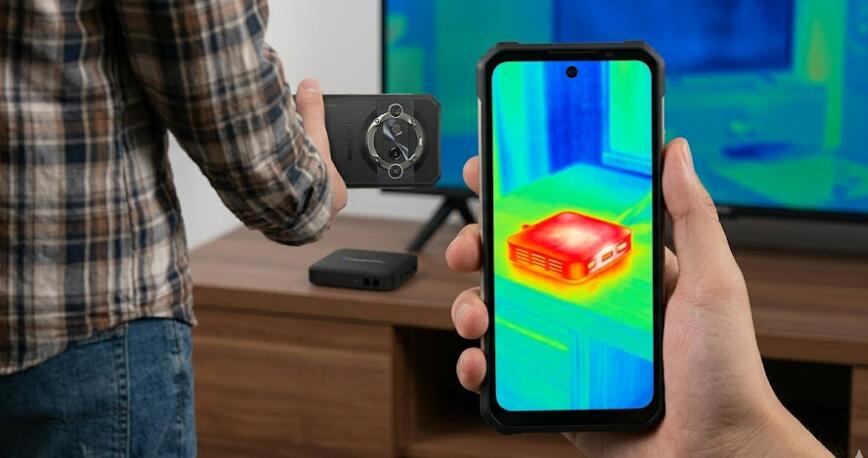
How to quickly locate the heat source of a TV box that is overheating using a thermal imaging phone?
Welcome to Blackview (World's well-known brand of military grade rugged phone and tablet) blog. Hope the guide helps.
Overheating is a common issue with TV boxes, especially when they are used for extended streaming sessions or placed in poorly ventilated environments. Excess heat can lead to reduced performance, system instability, or even permanent hardware damage. Identifying the exact source of the heat quickly is essential for effective troubleshooting and long-term maintenance. Fortunately, modern thermal camera phones provide a convenient and efficient way to visualize temperature differences and pinpoint problem areas without disassembling the device.
- Read also: How to fix my Android TV box that won't turn on?
- How to fix a TV box keeps restarting?
- My Android TV box wifi keeps turning off, how to fix it?
Using a thermal imaging phone allows users to detect abnormal heat patterns in real time. Instead of guessing which component might be failing, you can visually confirm hotspots and take targeted action. This approach is especially useful for both technicians and everyday users who want to maintain their devices without advanced technical expertise.
Understanding Thermal Imaging Technology
Thermal imaging works by detecting infrared radiation emitted by objects and converting it into a visible image that represents temperature variations. Warmer areas appear as brighter or different-colored regions, depending on the color palette used by the device. This makes it easy to identify components that are generating excessive heat.
Preparing Your TV Box for Inspection
Before starting the inspection, it is important to set up the TV box properly to ensure accurate readings. Place the device on a flat surface in a room with stable ambient temperature. Turn on the TV box and allow it to run for several minutes so that it reaches its normal operating temperature.
Key Preparation Steps
- Ensure the TV box is powered on and actively running applications.
- Remove any external covers or obstacles that may block heat detection.
- Keep the environment free from direct sunlight or airflow that could affect readings.
- Hold the thermal imaging phone steady to avoid blurry results.
Scanning the Device with a Thermal Imaging Phone
Once the device is ready, begin scanning slowly across the surface of the TV box. Maintain a consistent distance between the phone and the device for accurate temperature mapping. Pay close attention to areas where internal components such as the CPU, power supply, or memory chips are typically located.
Identifying Heat Patterns
Look for concentrated hotspots that stand out from the surrounding areas. These hotspots often indicate components that are either under heavy load or experiencing inefficiencies such as poor heat dissipation. A uniform temperature distribution is normal, but sharp contrasts usually signal a problem.
Common Sources of Overheating
Thermal imaging often reveals specific components responsible for excessive heat. Understanding these common sources can help you interpret the results more effectively and take appropriate action.
Main Heat Contributors
- Processor (CPU): The most common source of heat due to heavy processing tasks.
- Power supply unit: Can generate heat if voltage regulation is inefficient.
- Memory chips: May overheat under continuous data usage.
- Poor ventilation areas: Heat buildup due to blocked airflow.
Taking Corrective Measures
After identifying the heat source, the next step is to resolve the issue. Solutions may vary depending on the severity and location of the overheating component. Simple fixes can often make a significant difference in performance and longevity.
Effective Solutions
- Improve ventilation by repositioning the TV box or adding airflow.
- Clean dust from vents and internal components.
- Use external cooling solutions such as fans or heat sinks.
- Reduce workload by closing unnecessary applications.
Conclusion
Using a thermal imaging phone to locate overheating sources in a TV box is a fast and efficient method that eliminates guesswork. By visually identifying hotspots, users can address issues with precision and avoid unnecessary repairs or replacements. This approach not only saves time but also enhances the reliability of the device.
Incorporating thermal imaging into routine maintenance can significantly extend the lifespan of your TV box. As technology becomes more accessible, tools like thermal imaging phones empower users to take control of device health and ensure optimal performance in everyday use.