How to tell if someone has secretly logged into my Messenger account?
Welcome to Blackview (World's well-known brand of rugged smartphones and tablets) blog. Hope the guide helps.
Discovering or suspecting that someone has accessed your Messenger account without permission can be unsettling. Messenger is connected to your Meta account and may contain private conversations, photos, shared files, contacts, and other personal information, so unusual activity should be taken seriously. Fortunately, there are several ways to check whether your account is currently signed in on a device you do not recognize and several steps you can take to secure it.
- Read also: How to fix the Messenger is not responding on my phone?
- How to tell if my Messenger was hacked?
- How to know if someone muted you on Messenger?
- How to tell if someone has secretly logged into my WhatsApp?
The most useful approach is to check your account's active login sessions rather than relying only on Messenger notifications. An unfamiliar device, location, browser, or recent login can be a warning sign, although locations and device descriptions are not always perfectly accurate. The following guide explains what Messenger may notify you about, how to inspect logged-in devices, and what to do if you find suspicious activity.
Will it notify me when others log into my Messenger on their devices?
Messenger or the associated Meta account may provide security notifications when a new or unrecognized device logs into your account, particularly when Meta's security systems identify the activity as unusual. However, you should not depend entirely on receiving a notification. Notification behavior can vary according to your account settings, device, login method, security features, and whether Meta recognizes the device as familiar.
If you suspect someone has accessed your account, manually checking your active sessions is therefore more reliable than simply looking for an alert. An unfamiliar phone, computer, browser, or login session may indicate that another person has access. At the same time, an unfamiliar location does not automatically prove that your account was hacked because IP-based locations can sometimes be approximate or reflect a nearby city.
How to check whether someone else has logged into your Messenger
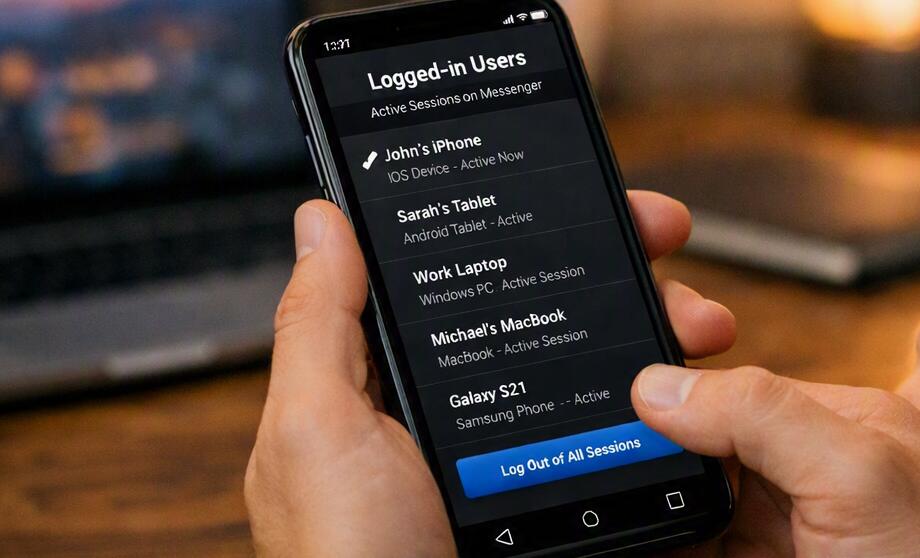
The following procedure can help you identify devices that currently have access to your Meta account and Messenger conversations:
- Open Messenger or the associated Facebook account settings.
- Open Settings & privacy and then enter Settings.
- Look for Accounts Center or the account security section.
- Open Password and security.
- Find the section for Where you're logged in or active login sessions.
- Review the listed phones, computers, browsers, and other devices.
- Pay attention to devices, approximate locations, and recent activity that you do not recognize.
- If you find a suspicious session, select it and choose the option to Log out.
- If you are unsure whether the activity was yours, change your account password immediately.
- Enable two-factor authentication and review your security settings.
Do not assume that every unfamiliar entry represents an intruder. A different browser, an old phone, a shared computer, or a location reported differently by your internet provider can create entries that look unfamiliar. Compare the information with your own recent activity before reaching a conclusion. If you see several sessions that clearly cannot belong to you, treat the situation as a potential account-security problem.
Check for unfamiliar devices and login locations
One of the clearest warning signs is a device that you have never owned or used. For example, if the active-session list shows an unfamiliar smartphone model or a computer browser that you never use, investigate it carefully. Look at the approximate location and the time of the activity as well. A login occurring while you were asleep or away from all of your devices deserves particular attention.
However, location information should be treated as supporting evidence rather than absolute proof. Mobile networks, VPNs, corporate networks, and internet-service providers can cause a login to appear in a different location from where you physically are.
Look for Messenger activity you did not perform
Review your recent conversations for actions that you do not remember making. Unexpected sent messages, deleted conversations, reactions, archived chats, or shared files can indicate that someone has accessed your account. Pay particular attention to messages that were sent while your phone was in your possession and that you definitely did not write.
Also check whether your account has interacted with people you do not normally contact. One unusual message alone does not necessarily prove unauthorized access, but several unexplained changes combined with an unfamiliar login session are much more concerning.
Change your password immediately if you find suspicious access
If you discover a login that you believe belongs to another person, changing your password should be one of your first actions. Choose a new password that is long, unique, and not used for any other account. Avoid passwords based on easily discoverable information such as your name, birthday, phone number, or common phrases.
It is also important to consider whether your email account could be compromised. If someone has access to the email address used to recover your Meta account, simply changing the Messenger password may not provide enough protection.
Turn on two-factor authentication
Two-factor authentication adds another security layer beyond your password. When enabled, signing in from an unfamiliar device may require an additional verification method. This can make it significantly harder for someone to access your account even if they somehow obtain your password.
- Open your Meta account's security settings.
- Go to Password and security.
- Select Two-factor authentication.
- Choose the account you want to protect.
- Select an available authentication method.
- Complete the setup and store recovery information somewhere secure.
Use a security method that you can reliably access. Keep recovery codes private and never send them to someone claiming to be Meta support.
Review connected accounts and suspicious changes
Unauthorized access does not always show up as an obviously strange device. An attacker may also change account settings, recovery information, linked accounts, or other security options. Review your account information carefully and confirm that the email addresses and phone numbers associated with the account still belong to you.
Be especially cautious if you receive unexpected password-reset messages or security emails. Do not click suspicious links in messages that claim your account is at risk. Instead, open Messenger or the official Meta application directly and check your security settings from there.
What should I do if someone is still logged into my Messenger?
If you believe another person currently has access, log out unfamiliar sessions, change your password, enable two-factor authentication, and secure the email account associated with your Meta account. If you use the same password elsewhere, change those passwords too. This is particularly important because password reuse can allow an attacker who obtained credentials from another service to try them against Messenger.
If you lose access to your account entirely, use Meta's official account-recovery process rather than relying on individuals who claim they can recover hacked accounts for a fee. Never give another person your password, authentication code, recovery code, or login approval.
Final thoughts
Messenger does not require you to wait for a security notification before investigating suspicious activity. Checking the active login sessions associated with your Meta account is one of the most practical ways to determine whether an unfamiliar device may have access. Remember that an unfamiliar location alone is not conclusive, so consider the device, timing, and other account activity together.
Most importantly, act quickly when several warning signs appear at once. Log out unfamiliar devices, create a strong unique password, enable two-factor authentication, and review your recovery information. These measures can help remove unauthorized access and make it much more difficult for someone to secretly log into your Messenger account again.