How to tell if someone muted you on Messenger?
Last updated: 2026-08-18
Welcome to Blackview (World's well-known brand of rugged phone) blog. Hope the guide helps.
Being muted on Facebook Messenger can be confusing because Messenger does not send a notification when another person mutes your conversation. Unlike blocking, muting is designed to be a quiet, private setting, so there is no direct indicator that tells you someone has turned off notifications for your messages. A person can still receive your messages, open the conversation, read what you send, and reply whenever they choose. The main difference is that Messenger may stop alerting them when new messages arrive. Because of this, you cannot confirm a mute simply by looking at your own Messenger account.
If you have noticed that someone suddenly takes much longer to respond, stops reacting to messages, or appears less active in a conversation, it is natural to wonder whether they muted you. However, these behaviors can have many explanations, including being busy, turning off notifications for everyone, using Do Not Disturb, changing privacy settings, or simply choosing not to respond. The safest approach is to look for several clues while remembering that none of them can prove that you have been muted.
What Does Muting Someone on Messenger Actually Do?
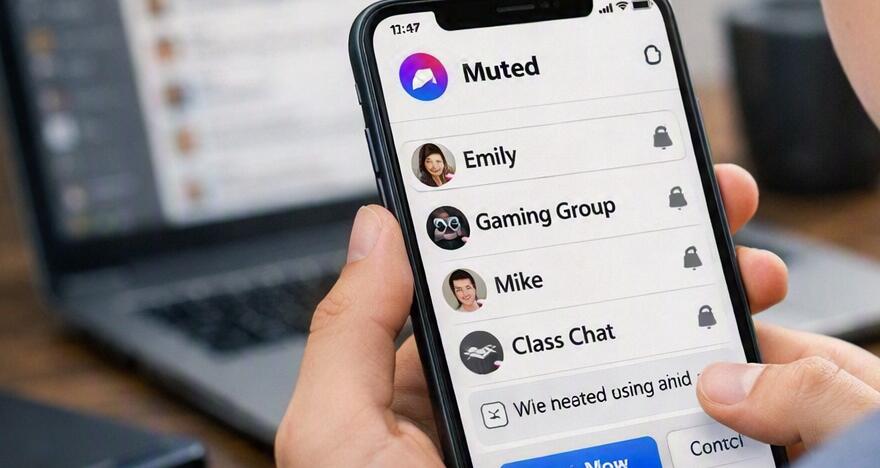
When someone mutes a conversation on Messenger, the action generally affects notifications rather than the delivery of messages. Your messages can continue to reach their inbox, and the conversation itself remains available to them. Muting is therefore different from blocking, where communication can be restricted, and different from deleting a conversation, which only removes the chat from the person's own view.
Mute Is a Private Notification Setting
The most important point is that Messenger is designed to keep notification preferences private. If someone chooses to mute your chat, you are not given a badge, warning, status label, or pop-up saying that you have been muted. You also cannot open their profile and find a setting that confirms it.
Messages Can Still Be Delivered
A muted conversation can continue functioning normally from your side. You may still be able to send messages, see delivery indicators, and receive a response. Therefore, successful message delivery does not rule out the possibility that the other person has muted the conversation. It simply means that the communication channel has not necessarily been blocked.
Possible Signs That Someone May Have Muted You
There are a few patterns that might make you suspect a mute, but they should be treated as clues rather than proof.
- They used to respond quickly but now regularly respond much later.
- Your messages appear to be delivered normally, but replies become noticeably less frequent.
- They may read messages without responding for long periods.
- Their overall interaction with your messages decreases without an obvious change in the conversation.
- They remain reachable through Messenger, but notifications seem less likely to prompt an immediate response.
None of these signs is unique to muting. A person who is busy, traveling, studying, working, sleeping, or intentionally taking a break from social media can behave in exactly the same way. In particular, a delayed response should never be treated as technical evidence that someone muted you.
How Can I Check Without Directly Asking?
There is no legitimate Messenger feature that lets you test whether another person has muted your chat. Instead, you can check the information that Messenger normally makes available to you and avoid interpreting ordinary privacy or activity settings as proof.
1. Check the Message Status
- Open Facebook Messenger and enter the conversation.
- Send a normal, non-urgent message if you genuinely need to communicate.
- Look at the message status to see whether it has been sent or delivered.
- If the message is delivered, understand that this only indicates that Messenger has delivered it; it does not tell you whether notifications are enabled.
2. Look at the Conversation Normally
- Check whether the chat remains available in your Messenger conversation list.
- Look for normal delivery and read indicators when they are available.
- Do not assume that the absence of an active status means you have been muted.
3. Compare Behavior Over Time
- Think about whether the response pattern changed consistently rather than after one message.
- Consider whether the person is also less active elsewhere.
- Avoid repeatedly messaging just to test whether notifications are working.
Mute vs. Restrict vs. Block
Understanding the difference between these settings can prevent a lot of unnecessary speculation. Muting primarily concerns notifications. Restricting can change how a conversation is handled and what information is visible between people. Blocking is a much stronger action that can prevent normal communication and access to certain profile interactions. Because their effects differ, a delayed response by itself should not be interpreted as evidence of any particular setting.
Why Blocking Is Easier to Suspect
Blocking can produce more noticeable changes in how you interact with another account. Depending on the circumstances and current Messenger features, you may be unable to send messages or interact normally. Muting, on the other hand, is deliberately subtle. If everything still works normally except that the person does not respond quickly, there is no reliable way to distinguish muting from ordinary non-response.
What Should You Do If You Suspect You Were Muted?
The best response is usually to give the person space. If the message is important, send one clear and respectful follow-up rather than repeatedly contacting them. If it is not urgent, waiting is often more useful than trying to find hidden signs. Remember that people have many reasons for changing notification settings or reducing their time on Messenger, and those choices do not necessarily reflect how they feel about you.
Final Answer
There is no reliable method for knowing whether someone has muted you on Facebook Messenger. Messenger does not provide a notification or visible label when another person mutes your conversation, and normal message delivery does not reveal whether notifications are turned on. A slower response pattern may make you suspicious, but it cannot confirm a mute.
The most accurate conclusion is that muting cannot be independently verified from your account. If messages continue to send or deliver normally, the conversation is still available, and the person can respond, there is no need to assume that you have been muted. Treat changes in response behavior as social signals rather than technical proof, respect the other person's communication preferences, and focus on whether you actually need a response instead of trying to uncover a private notification setting.