How to judge if someone secretly logged into your Snapchat?
Welcome to Blackview (World's well-known brand of rugged smartphones and tablets) blog. Hope the guide helps.
Discovering that someone may have secretly accessed your Snapchat account can be unsettling, especially because Snapchat contains private conversations, personal photos, saved memories, and information about your contacts. Fortunately, there are several signs you can check before assuming that your account has been compromised. Unfamiliar login activity, unexpected security alerts, changed account details, or messages you did not send can all provide useful clues.
- Read also: How to make Snapchat Story longer than 10 seconds?
- How to judge if someone muted you on Snapchat?
- Can you send a text without showing your number & how to send?
- How to tell if someone blocked your number?
- How to fix the Google Assistant something went wrong?
- How do I find a hidden WiFi network and connect it?
Snapchat also provides account-security features that can help you review active sessions and protect your account. The most important thing is to distinguish between a genuine unauthorized login and harmless activity, such as signing in on another device yourself or receiving an alert after reinstalling the app. The following guide explains what notifications you may receive, how to investigate suspicious access, and what to do if you believe someone has actually logged into your Snapchat account.
Will it notify me when others log into my Snapchat on their devices?
Snapchat can provide security notifications when it detects certain login activity, particularly when an account is accessed from an unfamiliar device or location. However, you should not assume that every unauthorized login will always generate a notification that you immediately notice. Notifications can depend on the circumstances of the login, your account-security settings, the device involved, and whether Snapchat recognizes the session.
For this reason, a missing notification does not necessarily prove that nobody has accessed your account. If you suspect unauthorized access, checking your account's active sessions or device-management information is more reliable than relying solely on push notifications or email alerts. You should also pay attention to unexpected password-reset messages, security codes, or account changes that you did not request.
How to check whether someone logged into your Snapchat
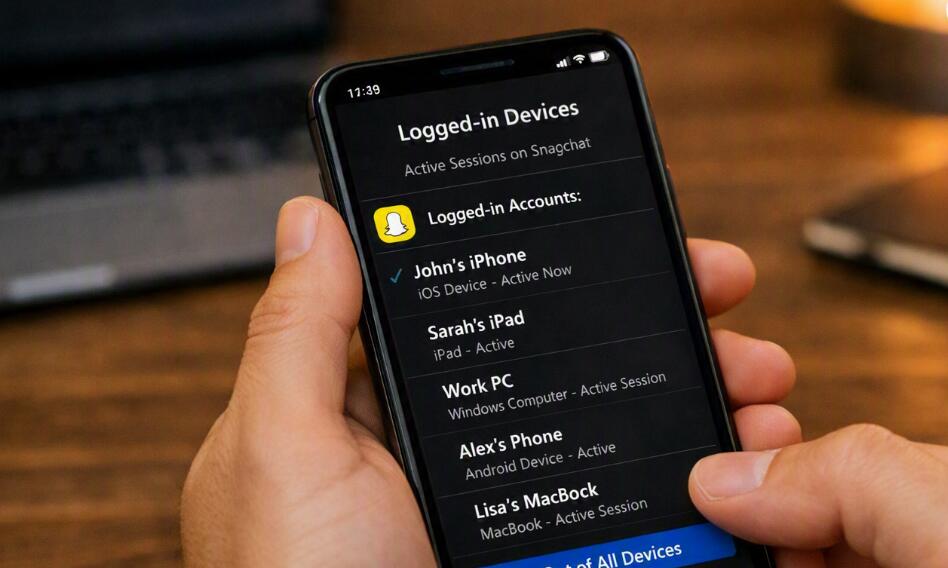
The quickest way to investigate suspicious access is to review the devices or sessions associated with your Snapchat account. Menu names can vary slightly depending on your Snapchat version and phone, but the general process is similar.
Step-by-step instructions
Follow these steps to look for unfamiliar access:
- Open the Snapchat app and sign in to your account.
- Tap your profile or Bitmoji to open your profile page.
- Tap the Settings icon to enter account settings.
- Look for the account-security or Session Management section.
- Review the devices or active sessions currently associated with your account.
- Check the listed devices carefully and identify anything you do not recognize.
- If an unfamiliar session appears, use the available option to log it out or terminate the session.
- Change your Snapchat password immediately if you believe the session was unauthorized.
- Enable Two-Factor Authentication if it is not already enabled.
- Review your recovery email address and phone number to make sure they still belong to you.
Do not ignore an unfamiliar device simply because its name looks generic. If you cannot connect the session with a phone, tablet, browser, or other device that you personally use, treat it as suspicious. After securing the account, continue checking for other signs of unauthorized activity.
Check for unfamiliar devices and sessions
An unknown active session is one of the strongest indicators that somebody may have accessed your Snapchat account. When reviewing the session list, think about every device on which you have recently used Snapchat. You may see a session that belongs to an old phone, a device shared with a family member, or a device you previously used and forgot about.
If you see a device that clearly does not belong to you, end that session. If multiple unfamiliar sessions appear, consider changing your password immediately rather than simply logging out individual devices. This reduces the possibility that somebody can regain access using an existing password.
Look for messages or activity you did not create
Another useful clue is unexpected activity inside the account. Check your recent conversations for messages that you do not remember sending. Also look for unusual Snaps, Stories, friend requests, account changes, or other actions that occurred while you were not using Snapchat.
One unexplained action does not automatically prove that your account was hacked. A friend with access to your unlocked phone, an accidental action, or a forgotten session can sometimes explain unusual activity. However, several unexplained actions occurring together should be treated as a serious security warning.
Watch for unexpected security codes and password alerts
Security codes and password-reset messages can reveal that somebody is attempting to access your account. If you receive a login verification code that you did not request, do not give that code to anyone. Someone who contacts you and asks you to forward a Snapchat verification code may be attempting to take control of your account.
Similarly, an unexpected password-reset notification deserves attention. Even if the attacker does not successfully log in, repeated unauthorized login attempts can indicate that someone knows your username, email address, phone number, or old password.
Check whether your account information has changed
Unauthorized access can become more serious if the intruder changes information that controls account recovery. Review your connected email address and phone number and make sure they have not been replaced or modified. You should also check important security settings, including two-factor authentication.
If your recovery information has changed without your permission, prioritize account recovery and password protection. A strong, unique password is especially important if you previously used the same password on another website or app.
Secure your Snapchat account after suspicious access
If you have reasonable evidence that another person accessed your account, act quickly instead of waiting for additional proof. Start by changing your Snapchat password to a new password that you have never used elsewhere. Then terminate unfamiliar sessions and enable two-factor authentication.
Security measures to take
Use the following checklist after detecting suspicious activity:
- Create a strong and unique Snapchat password.
- Log out unfamiliar devices or active sessions.
- Enable two-factor authentication.
- Verify your recovery email address and phone number.
- Never share Snapchat verification codes with other people.
- Change the password of any other account that used the same old password.
- Keep your phone's operating system and Snapchat app updated.
If you can no longer access the account because somebody changed the password or recovery information, use Snapchat's official account-recovery options rather than relying on unofficial services or people claiming they can recover hacked accounts for a fee.
In the end
Determining whether someone secretly logged into your Snapchat account requires looking at several clues rather than relying on a single notification. An unfamiliar session, unexplained messages, unexpected security codes, and changes to your account information are particularly important warning signs. Even when Snapchat does send a login alert, reviewing active sessions provides an additional way to determine whether a device you do not recognize has access to the account.
The best response to suspicious activity is to secure the account immediately: terminate unknown sessions, create a unique password, verify your recovery information, and enable two-factor authentication. These measures can significantly reduce the chance that someone who knows an old password or has previously accessed your account can continue using it.