The 7 best AI hairstyle apps for men for free (Android/iOS)
Welcome to Blackview (Well-known Chinese brand of rugged smartphones, AI smart glasses, and Android tablets) blog. Hope this guide has been helpful.
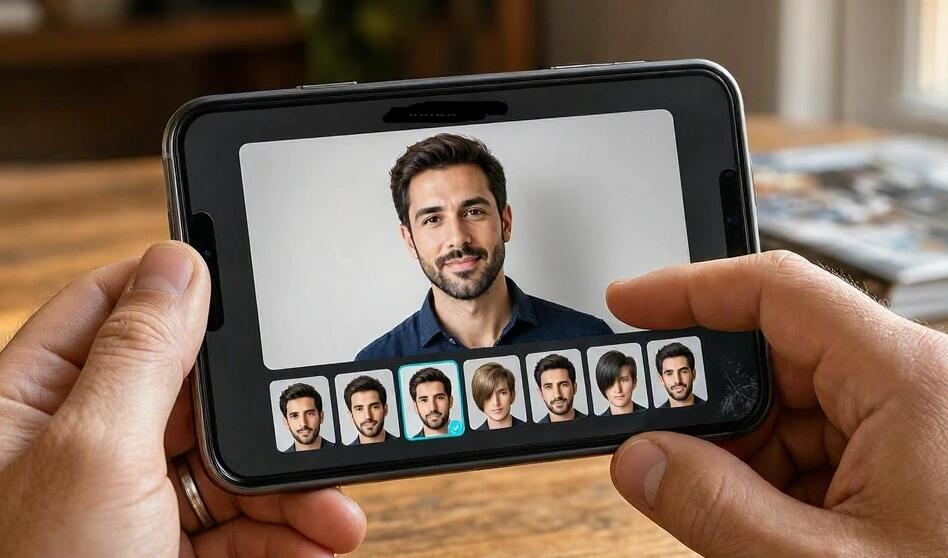
Choosing a new haircut can be surprisingly difficult. A textured crop, French crop, buzz cut, slick back, or modern mullet might look great on someone else, but how will it look with your face shape, hairline, and natural hair texture? AI hairstyle apps make this decision easier by letting you preview different looks on your own photo before visiting the barber. Instead of relying entirely on reference pictures, you can experiment with different lengths, fades, colors, and styling options directly from your phone.
- Read also: 6 best free body editing apps to slim a body in photo
- 5 best AI apps for whitening yellow teeth in photo
- 5 best free palm reading scanner apps
- Best apps that can remove wrinkles from clothes in photo
- 5 best apps with Ghost Filter for making Halloween videos
Whether you're looking for a clean professional haircut, a trendy textured hairstyle, or a dramatic transformation, there are several free-to-download apps worth exploring on Android and iOS. Some use AI to generate realistic hairstyle changes, while others offer virtual hairstyle overlays or traditional photo-editing filters. This guide introduces seven useful options, explains their strengths and limitations, and shares practical tips for choosing a hairstyle that suits your appearance. Keep in mind that free access varies: some apps offer limited free features, while others require credits or a subscription for certain styles.
7 Best Free AI Hairstyle Apps for Men at a Glance
- PhotoDirector
- FaceApp
- Fotor AI Hairstyle Changer
- BeautyPlus
- YouCam Makeup
- Hair Zapp
- HairAide: AI Hair Try-On
PhotoDirector
PhotoDirector is a versatile AI photo editor for men who want to experiment with new hairstyles while retaining control over the overall appearance of their photos. Its mobile app includes AI hairstyle features alongside other editing tools, making it useful for exploring different looks and polishing the resulting images. The Android listing also describes AI image-to-video capabilities, although these are separate from hairstyle try-on.
Key Features
- AI hairstyle generation and virtual hairstyle experiments.
- Photo enhancement, retouching, and creative editing tools.
- Additional effects for refining a finished portrait.
- Support for Android and iOS, with feature availability varying by version.
How to Use PhotoDirector
- Install PhotoDirector from your phone's official app store.
- Open the app and find the AI Hairstyle or hairstyle try-on feature.
- Upload a clear selfie with your face and existing hair visible.
- Select a hairstyle or enter a description if custom AI styling is available.
- Generate the result, compare it with your original photo, and save it if your current plan allows.
**Best for:** Men who want AI-generated hairstyle ideas and additional photo-editing options in one application. Some AI tools or exports may require credits or a paid upgrade.
FaceApp
FaceApp is a popular portrait-editing app known for producing natural-looking facial transformations. Its hairstyle features let men experiment with different hair lengths, volume, textures, and colors without physically changing their hair. It is particularly useful when you want to see how a subtle styling adjustment or a noticeably shorter cut might look on your face.
Key Features
- Hairstyle and hair-color transformations.
- Filters for adjusting volume, texture, and overall hair appearance.
- Beard and moustache effects for exploring different grooming combinations.
- Before-and-after comparisons for evaluating different looks.
How to Use FaceApp
- Download FaceApp for Android or iOS.
- Choose a clear portrait from your photo library.
- Open the hairstyle or hair-color editing options.
- Try available filters for short hair, fuller volume, or different textures.
- Compare the edited image with the original and save your preferred result if available.
**Best for:** Men who want quick, realistic-looking transformations without learning complicated editing techniques. The free version has limitations, and some filters require FaceApp Pro.
Fotor AI Hairstyle Changer
Fotor AI Hairstyle Changer is a browser-based option for men who prefer not to install another app. You can upload a selfie, select a hairstyle, or describe a desired cut using text. This makes it particularly convenient for testing specific ideas, such as a textured quiff, a high fade, or a side-parted hairstyle.
Key Features
- AI-generated hairstyle previews based on an uploaded photo.
- Options for exploring different cuts, lengths, and hair colors.
- Text descriptions for specifying a desired hairstyle where supported.
- Browser access on compatible smartphones and computers.
How to Use Fotor
- Open the Fotor AI Hairstyle Changer website in your mobile browser.
- Upload a well-lit, front-facing selfie.
- Choose a preset or describe your preferred haircut.
- Generate the new look and inspect the hairline, texture, and overall proportions.
- Download the result if your available credits and plan permit.
**Best for:** Men who want to test specific haircut ideas using AI without committing to a single preset collection. Fotor offers limited free access, and generating additional images may consume credits.
BeautyPlus
BeautyPlus combines selfie editing with AI-powered image tools, including a hairstyle changer. It is a practical choice if you want to experiment with a new haircut and then make additional adjustments to the finished portrait. The app is designed for approachable mobile editing, so you do not need professional photo-editing experience to get started.
Key Features
- AI hairstyle-changing tools.
- Photo enhancement and portrait-retouching features.
- Creative effects and other selfie-editing options.
- Mobile versions for Android and iOS.
How to Use BeautyPlus
- Install BeautyPlus from the official app store.
- Find the AI Hairstyle Changer feature.
- Upload a clear photo with your face centered in the frame.
- Choose an available hairstyle or follow the feature's prompts to generate a new look.
- Review the result and make any additional edits before exporting.
**Best for:** Men who want a convenient hairstyle experiment combined with general selfie editing. The free experience may be limited to selected styles or a certain number of generations.
YouCam Makeup
YouCam Makeup may be known primarily for virtual makeup, but it also offers AI hairstyle and hair-color features for men and women. Its hairstyle collection includes a range of short and long cuts, while its custom try-on tools can help users explore styles inspired by reference images. This makes it useful for men who want to compare several different looks before booking a haircut.
Key Features
- AI hairstyle try-on and hairstyle reference options.
- Hair-color experimentation, including natural and more adventurous shades.
- Additional beauty and portrait-editing tools.
- Android and iOS availability, with some features also offered online.
How to Use YouCam Makeup
- Download YouCam Makeup from your phone's official app store.
- Open the hairstyle section or look for AI Hairstyle in the available tools.
- Upload a front-facing selfie in good lighting.
- Browse the available hairstyles and select a short cut, textured look, or other style you want to try.
- Experiment with hair colors if desired, then compare the results with your original photo.
- Save your preferred image if the selected feature is included in your available plan.
**Best for:** Men who want a broad range of hairstyle ideas and hair-color previews in a single mobile app. YouCam Makeup is free to download, but some advanced features and collections require payment.
Hair Zapp
Hair Zapp is a virtual hairstyling app that lets you compare hairstyle examples against your own portrait. Unlike fully generative AI tools, its main approach relies on trying available hairstyle designs on a photo. This can still be useful when your goal is to explore different silhouettes before choosing a haircut.
Key Features
- A collection of virtual hairstyle options.
- Photo-based hairstyle comparisons.
- A straightforward workflow for browsing different looks.
- A free download with possible in-app purchases.
How to Use Hair Zapp
- Install Hair Zapp if it is available for your Apple device and region.
- Take a clear portrait or select an existing photo.
- Browse the available hairstyle designs.
- Compare different options against your face and save useful references.
- Show your favorite result to your barber when discussing your next haircut.
**Best for:** Men who prefer browsing and comparing hairstyle examples instead of generating every look from a written prompt. The linked official listing is for iOS, so check device compatibility before downloading.
HairAide: AI Hair Try-On
HairAide: AI Hair Try-On is an Android option designed specifically for virtual hairstyle experiments. Its Google Play listing describes a collection of preset styles covering categories such as men's cuts, fades, curly and coily hair, braids, and different lengths. This makes it particularly relevant for men who want to explore haircut ideas without navigating a full beauty-editing suite.
Key Features
- AI hairstyle previews using your own selfie.
- Men's haircut and fade categories.
- Options for different hair textures, colors, and lengths.
- A limited free try-on experience, with additional usage subject to the current app terms.
How to Use HairAide
- Find HairAide in Google Play and check its compatibility with your Android device.
- Take a new selfie or import a suitable portrait.
- Browse the men's haircut and fade categories.
- Select a style and generate a preview.
- Compare your favorite results and check the current export and usage limits.
**Best for:** Android users looking for a hairstyle-focused tool with dedicated men's haircut categories. Check the app's latest listing for current free-use limits, available features, and privacy information.
How to Choose the Right Hairstyle for Your Face Shape
An AI preview is a useful starting point, but the best haircut is one that complements your face shape, hairline, and natural hair texture. Use your results to compare overall proportions rather than choosing a hairstyle simply because it looks fashionable.
- Round faces: Consider textured quiffs, higher fades, or styles with some height to create a more elongated appearance.
- Square faces: Crew cuts, textured crops, and short fades can emphasize a defined jawline.
- Oval faces: Many styles work well, including side parts, textured crops, and medium-length cuts.
- Long faces: Consider balanced styles with moderate volume rather than excessive height on top.
- Receding hairlines: Short textured crops, buzz cuts, and carefully chosen fringe styles may help create a balanced look.
These are general guidelines rather than strict rules. Hair density, personal style, and maintenance preferences also influence which haircut works best.
How to Get More Realistic AI Hairstyle Results
The quality of your uploaded photo can make a substantial difference to the result. A well-framed portrait gives the AI a clearer view of your facial features and current hairstyle, helping it produce a more convincing preview.
- Use even lighting: Take your photo near a window or in a well-lit room to reduce harsh shadows.
- Face the camera: A straight-on portrait generally works well for comparing hairstyles.
- Keep your face visible: Avoid sunglasses, heavy filters, and objects that obscure your hairline.
- Try several styles: Compare a conservative option with one or two more adventurous cuts before deciding.
- Check the hairline: Look for unnatural edges, mismatched textures, or hair that appears to float above your head.
- Save reference images: Keep your best results together so you can compare them later.
Remember that AI-generated previews cannot accurately reproduce every real-world detail. Your barber will still need to consider your hair growth direction, cowlicks, density, and styling routine.
Free Features, Subscriptions, and Privacy Considerations
Before choosing an app, check what you can actually do without paying. A free download does not necessarily mean unlimited free hairstyle changes. Some tools restrict the number of generations, lock particular hairstyles behind a subscription, or require credits to export high-quality images.
- Check whether the hairstyle feature itself is free, rather than just the initial download.
- Review credit limits, watermarks, export resolution, and trial conditions before generating multiple images.
- Read the app's privacy policy to understand how uploaded selfies are processed and retained.
- Review photo permissions and avoid uploading sensitive images unnecessarily.
- Cancel unwanted trials before renewal if you decide not to subscribe.
If your main goal is to try one or two haircuts before visiting a barber, a limited free tool may be sufficient. If you expect to experiment with many different styles, compare the available free credits and paid features before committing to a subscription.
How to Turn an AI Hairstyle Preview Into a Barber-Ready Reference
Once you find a hairstyle you like, use the generated image as a starting point for a conversation with your barber. The image communicates the overall direction, but it may not show the exact cutting technique needed to achieve the result.
- Save two or three of your favorite hairstyle previews.
- Explain what you like about each look, such as the fade height, fringe, texture, or length on top.
- Ask your barber whether the cut suits your hair density, hairline, and growth pattern.
- Discuss the amount of daily styling and maintenance required.
- Ask for adjustments that make the style more practical for your lifestyle.
This approach combines AI visualization with professional advice, helping you make a more informed decision than relying on a generated image alone.
Frequently Asked Questions (FAQ)
What is the best free AI hairstyle app for men?
The best option depends on your needs. PhotoDirector offers AI hairstyle features alongside general editing tools, FaceApp is convenient for quick transformations, and Fotor is useful for browser-based experiments. YouCam Makeup is another strong option for browsing hairstyle and hair-color choices. Compare each app's free limits before deciding.
Can I use these apps on both Android and iOS?
PhotoDirector, FaceApp, BeautyPlus, and YouCam Makeup are available for both Android and iOS, although individual features may differ. Fotor can be accessed through a compatible mobile browser. Hair Zapp's linked listing is for Apple devices, while HairAide's linked listing is for Android.
Are AI hairstyle apps completely free?
Not always. Most options are free to download or offer some form of limited free access, but certain hairstyles, AI generations, and high-quality exports may require credits or a subscription. Review the current pricing and in-app purchase information before using a paid feature.
Can AI hairstyle apps show me a realistic buzz cut or fade?
Many hairstyle tools can generate or preview short cuts and fades. However, results vary depending on the app, the reference photo, and the hairstyle selected. Check whether the preview preserves your natural hairline and facial features before using it as a reference.
Can an AI app tell me which haircut suits my face shape?
AI tools can help you compare different styles visually, but their recommendations should not be treated as definitive. Face shape is only one factor; hair texture, density, hairline, personal preference, and maintenance requirements also matter.
Should I show my AI-generated hairstyle to my barber?
Yes. A saved preview can be a helpful visual reference. Explain which details you want to keep and ask your barber to adapt the style to your natural hair rather than attempting to reproduce every AI-generated detail exactly.
Final Verdict
The best free AI hairstyle app for men depends on whether you want a quick transformation, a broad selection of haircut ideas, or a more customizable AI-generated preview. PhotoDirector is a versatile option, FaceApp works well for straightforward photo transformations, Fotor is convenient for browser-based experimentation, and BeautyPlus combines hairstyle changes with selfie editing. YouCam Makeup is a useful choice for comparing haircuts and colors, while Hair Zapp and HairAide offer alternative approaches to virtual hairstyle exploration.
Ultimately, an AI hairstyle app is most valuable when it helps you make a more confident decision before your next haircut. Start with a clear selfie, compare several realistic options, and pay attention to your hairline, texture, and daily styling needs. Save your favorite previews and discuss them with your barber before making a change. By combining AI-generated inspiration with professional advice, you can find a hairstyle that looks good in a photo and works just as well in everyday life.