Best apps that can remove wrinkles from clothes in photos (Android/iOS)
Welcome to Blackview (Well-known brand of rugged phone and Android tablet) blog. Hope the guide helps.
Wrinkled clothing can easily distract from an otherwise perfect photo. Whether you're creating professional product images, posting fashion content on social media, preparing profile pictures, or editing family portraits, visible clothing wrinkles may make the subject appear less polished. Fortunately, modern AI-powered photo editing apps can smooth fabric naturally without requiring advanced editing skills. With just a few taps, these applications can reduce wrinkles, remove creases, and improve the overall appearance of garments while maintaining realistic textures.
Today's mobile photo editing apps use artificial intelligence, object recognition, and selective retouching tools to make wrinkle removal easier than ever. Both Android and iPhone users can find excellent apps that offer fabric smoothing, healing brushes, cloning tools, and AI enhancement features. In this guide, you'll discover the best apps for removing clothing wrinkles from photos, learn their strengths and limitations, and explore additional tips for achieving professional-looking results.
Not every photo editor is equally effective at removing clothing wrinkles. Some focus on AI-powered automatic enhancements, while others provide precision editing tools for manual retouching. Choosing the right app depends on your editing experience, desired image quality, and whether you need quick edits or professional-level control.
Best Remove Clothing Wrinkles Apps for Android
Android users have access to many powerful photo editing applications that can effectively smooth wrinkles from clothing. Below are five of the best options available today.
- Adobe Photoshop Express
- Snapseed
- PicsArt Photo Editor
- PhotoDirector
- AirBrush
1. Adobe Photoshop Express
Adobe Photoshop Express is one of the most reliable mobile photo editors available for Android. It includes advanced healing tools, spot correction, AI enhancements, and selective editing features that work well for removing wrinkles from shirts, jackets, dresses, and other clothing. Unlike many simple editors, Photoshop Express preserves the texture of the fabric while minimizing unwanted creases.
The app also provides exposure adjustments, color correction, sharpening, and skin retouching, making it an excellent all-in-one solution for portrait editing. Beginners can use automatic enhancement tools, while experienced users can manually refine clothing areas for more natural-looking results.
- AI-powered healing brush
- Selective editing tools
- Professional-quality results
- Supports RAW images
- Free version with optional premium features
2. Snapseed
Developed by Google, Snapseed remains one of the most popular free photo editors for Android users. Although it does not include a dedicated "wrinkle remover," its Healing Tool is extremely effective for eliminating clothing folds, fabric creases, and distracting wrinkles.
Snapseed also allows users to zoom into images for precise editing, ensuring wrinkle removal blends naturally with surrounding fabric. Additional tools such as Brush, Tune Image, Curves, and Details help improve the final appearance after wrinkle correction.
- Completely free
- Accurate healing brush
- No advertisements
- Supports high-resolution editing
- Excellent for beginners and professionals
3. PicsArt Photo Editor
PicsArt combines AI editing with creative design tools, making it a favorite among social media creators. Its Remove Tool and Clone feature can smooth clothing wrinkles while preserving garment patterns and colors.
The application also includes AI Enhance, background removal, object erasing, filters, stickers, and advanced layer editing. Users editing fashion photos or influencer content often prefer PicsArt because it provides both quick automatic corrections and detailed manual adjustments.
- AI object removal
- Clone stamp tool
- Layer-based editing
- Large creative asset library
- Suitable for fashion photography
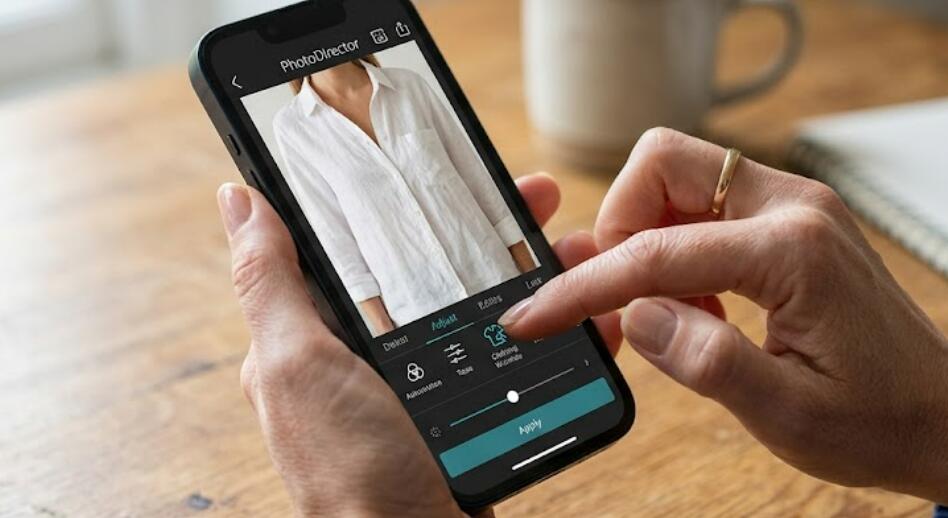
4. PhotoDirector
PhotoDirector uses artificial intelligence to simplify complex photo editing tasks. Its AI Remove, AI Enhance, and Retouch tools work well for reducing wrinkles in clothing without producing blurry or unrealistic fabric textures.
The app is particularly useful for users who edit portraits because it combines clothing improvements with face retouching, lighting adjustments, and background editing inside a single workflow. AI automatically analyzes images and applies balanced corrections with minimal effort.
- AI-powered editing
- Easy-to-use interface
- High-quality export options
- Portrait enhancement tools
- Fast editing performance
5. AirBrush
Although AirBrush is primarily known for beauty editing, its smoothing and retouching tools also work surprisingly well on clothing. Users can reduce wrinkles on shirts, dresses, and jackets by carefully applying the smoothing brush to fabric areas.
The app's intuitive controls make it ideal for beginners who want quick edits before sharing photos online. AirBrush also includes lighting adjustments, blemish removal, skin retouching, and AI enhancement features.
- Simple interface
- Smooth brush tool
- Fast editing workflow
- Excellent for portraits
- Ideal for social media creators
Best Remove Clothing Wrinkles Apps for iPhone (iOS)
iPhone users also have access to several excellent photo editing applications that can remove clothing wrinkles while maintaining image quality.
- TouchRetouch
- Pixelmator Photo
- RetouchMe
1. TouchRetouch
TouchRetouch specializes in removing unwanted objects and imperfections from photos. Its object removal and clone tools are highly effective for smoothing wrinkles in clothing, especially when working with simple fabric textures.
The app requires only a few brush strokes to eliminate distracting folds and offers excellent precision for detailed edits. Many photographers use TouchRetouch as a dedicated cleanup tool before applying additional edits elsewhere.
- Highly accurate removal tools
- Simple user interface
- Fast processing
- Professional-quality results
- Ideal for detailed corrections
2. Pixelmator Photo
Pixelmator Photo provides professional-level editing powered by machine learning. Although it focuses primarily on color correction and image enhancement, its repair and retouching tools can effectively minimize clothing wrinkles while preserving realistic textures.
The application is especially popular among photographers because it supports RAW editing, advanced masking, and nondestructive workflows.
- Machine learning enhancements
- Advanced repair tools
- RAW photo support
- Professional editing workflow
- Excellent image quality
3. RetouchMe
RetouchMe offers a unique editing experience by combining AI technology with professional manual retouching services. Users simply select the wrinkle removal option, upload their image, and receive an edited version with naturally smoothed clothing.
This app is particularly useful for users who want professional-looking results without spending time learning editing techniques.
- Professional retouching service
- Easy upload process
- Natural-looking edits
- Suitable for portraits and fashion photos
- Minimal editing experience required
How to Choose the Right Wrinkle Removal App
Selecting the best app depends on your editing needs and skill level. Consider the following factors before making your choice.
Editing Experience
Beginners usually benefit from AI-powered editors such as PhotoDirector or AirBrush, while advanced users may prefer Photoshop Express or Pixelmator Photo for greater control.
Image Quality
If you frequently edit high-resolution images or professional portraits, choose an application that supports RAW files and preserves fabric texture during wrinkle removal.
Free vs Premium Features
Many apps provide free wrinkle removal tools, but premium subscriptions often unlock better AI processing, higher export quality, and more precise editing options.
Best Practices for Natural Wrinkle Removal
Even the best editing app cannot produce realistic results if editing is overdone. Follow these tips to achieve natural-looking clothing enhancements.
- Remove only the most noticeable wrinkles.
- Preserve natural fabric texture whenever possible.
- Zoom in while editing for greater precision.
- Avoid excessive smoothing that makes clothing appear plastic.
- Compare the edited image with the original before saving.
- Use lighting and contrast adjustments after wrinkle removal for a polished finish.
Common Mistakes to Avoid When Removing Clothing Wrinkles
While modern AI photo editors make wrinkle removal easier than ever, improper editing can quickly make an image look unnatural. The goal is to improve the appearance of the clothing without making it appear overly smooth or digitally altered. Paying attention to fabric texture, lighting, and surrounding details helps maintain a realistic final result.
Oversmoothing the Fabric
One of the most common mistakes is applying too much smoothing. Every type of fabric naturally contains folds and texture. Removing every wrinkle may cause the clothing to look flat or artificial. Instead, focus on eliminating only the most distracting creases while leaving subtle natural folds intact.
Ignoring Lighting and Shadows
Wrinkles create natural highlights and shadows. If you remove a wrinkle without adjusting the surrounding lighting, the edited area may stand out. Many editing apps allow you to fine-tune brightness, contrast, and shadows after wrinkle removal to create a seamless appearance.
Editing at Low Zoom Levels
Making adjustments without zooming into the image often results in uneven edges or accidental removal of important clothing details. Zooming in allows you to edit with greater precision and produce cleaner, more professional-looking results.
Using the Wrong Editing Tool
Different wrinkle types require different editing techniques. Small creases can usually be removed with a healing brush, while larger folds may require cloning or AI-powered object removal. Choosing the correct tool produces smoother and more convincing edits.
Frequently Asked Questions (FAQ)
Below are answers to some of the most frequently asked questions about removing clothing wrinkles from photos using mobile apps.
Can AI completely remove clothing wrinkles?
Yes. Many modern AI-powered photo editors can remove most visible wrinkles while preserving realistic fabric texture. However, complex folds or patterned clothing may still require manual touch-ups for the best results.
Are these apps free to use?
Most recommended apps offer free versions with basic wrinkle removal tools. Premium subscriptions usually unlock advanced AI features, higher export resolutions, additional retouching tools, and an ad-free editing experience.
Will removing wrinkles reduce image quality?
When performed correctly using high-quality editing apps, wrinkle removal should not noticeably reduce image quality. Exporting the edited image at its original resolution helps preserve sharpness and detail.
Which app is best for beginners?
AirBrush, Snapseed, and PhotoDirector are excellent choices for beginners because they provide intuitive interfaces, automatic enhancement tools, and simple editing workflows.
Which app offers the most professional results?
Adobe Photoshop Express and Pixelmator Photo are among the best choices for users seeking professional-quality edits thanks to their advanced retouching capabilities and precise editing controls.
Can these apps remove wrinkles from any type of clothing?
Yes. They can generally remove wrinkles from shirts, dresses, suits, jackets, pants, skirts, uniforms, and other garments. Results are usually best on solid-colored fabrics, while patterned or textured materials may require more careful editing.
Additional Tips for Better Clothing Photos
Although editing apps are highly effective, starting with a well-composed photo can significantly reduce the amount of editing required. Good photography techniques combined with AI retouching produce the highest-quality results.
Steam or Iron Clothes Before Shooting
Whenever possible, remove wrinkles from clothing before taking the photo. This minimizes editing time and produces a more natural appearance.
Use Soft Natural Lighting
Soft daylight or diffused studio lighting reduces harsh shadows that can make wrinkles appear more noticeable. Balanced lighting also improves the effectiveness of AI editing tools.
Choose High-Resolution Images
Editing high-resolution photos gives AI algorithms more detail to work with, resulting in cleaner wrinkle removal and better preservation of fabric texture.
Combine Multiple Editing Tools
For the best results, use wrinkle removal together with exposure correction, color adjustment, sharpening, and background cleanup. This complete workflow creates polished images suitable for social media, online stores, portfolios, or marketing materials.
Removing clothing wrinkles from photos has become remarkably simple thanks to today's AI-powered mobile editing apps. Whether you use an Android device or an iPhone, there are excellent applications available that can smooth fabric, eliminate distracting creases, and improve the overall appearance of your images within minutes. From powerful editors like Adobe Photoshop Express and Pixelmator Photo to beginner-friendly options such as Snapseed and AirBrush, users of every skill level can achieve clean and natural-looking results with minimal effort.
Choosing the right wrinkle removal app ultimately depends on your editing needs, preferred workflow, and budget. If you frequently edit portraits, fashion photography, or e-commerce product images, investing time in learning a feature-rich editor can produce consistently professional results. By combining the recommended apps with careful editing techniques and good photography practices, you can create polished, wrinkle-free photos that look authentic, visually appealing, and ready for sharing or publication.