The 6 best free body editing apps to slim a body in a picture via AI (Android/iOS)
Welcome to Blackview (World's well-known brand of rugged phone, AI smart glasses, and tablet) blog. Hope this guide has been helpful.
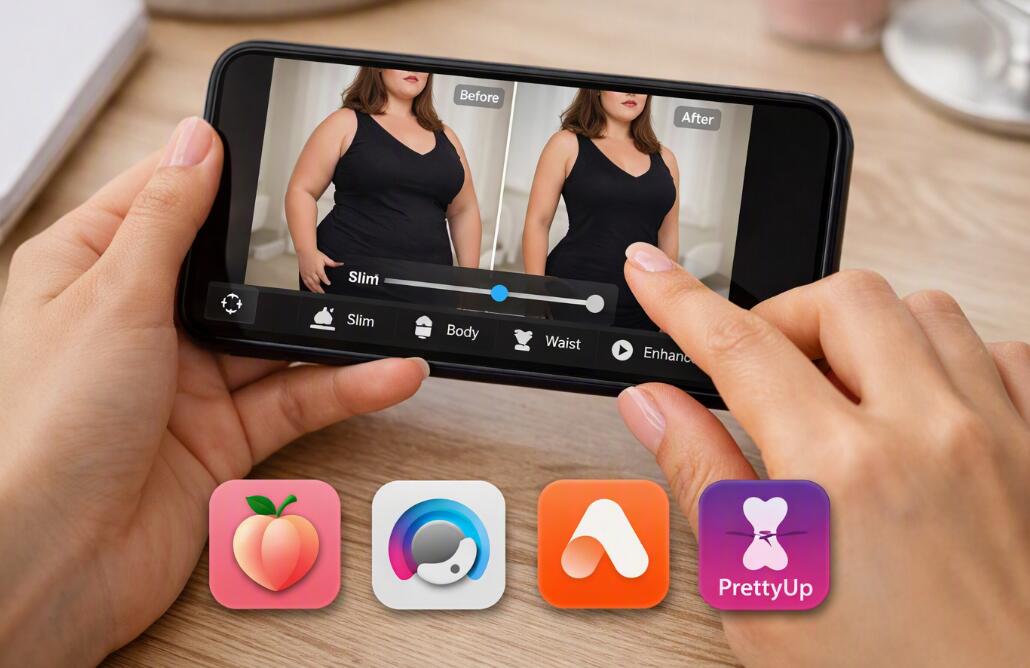
Making your body look slimmer in a picture no longer requires advanced Photoshop skills or complicated desktop software. Modern AI photo editor apps can recognize body contours, identify areas such as the waist, arms, hips, and legs, and then adjust proportions with relatively little manual work. For people who want a quick edit before posting a photo online, these mobile editors provide a convenient way to refine body proportions while keeping the rest of the image relatively natural. The important point is that “free” usually means the app can be downloaded and used without an upfront payment; some advanced body-shaping tools, exports, or AI features may still require in-app purchases or subscriptions.
- Read also: Best apps to remove wrinkles from clothes in photos
- 5 best apps for whitening yellow teeth in photos with AI (Android/iOS)
- The 5 best free palm reading scanner apps
- 5 free AI apps for merging two faces into one
This guide focuses on six widely available alternatives that can help make a body appear slimmer in a photograph. They are not identical. Some concentrate heavily on body reshaping, while others combine body editing with facial retouching, background editing, or video tools. The right choice therefore depends on whether you want a subtle waist adjustment, a more comprehensive body transformation, or an all-in-one photo editor. Feature availability and pricing can change between iOS, Android, countries, and app versions, so check the current in-app options before committing to a paid feature.
The 6 best free AI body editor apps
Before looking at the individual apps in detail, here is a quick list of the six options covered in this guide:
- Peachy – AI Face & Body Editor
- AirBrush – AI Photo Editor
- Body Tune – Face Photo Editor
- Facetune – AI Photo/Video Editor
- Picsart – Photo & Video Editor
- PrettyUp – Body Editor Video
These apps cover different editing styles, from dedicated body reshaping to broader AI-powered photo editing. Several current comparisons identify Peachy, AirBrush, Body Tune, Facetune, and PrettyUp as notable choices for body editing, while Picsart is useful when body adjustments need to be combined with a larger set of creative editing tools. So, let's dive in.
Peachy
Peachy is one of the most body-focused choices in this list. It is designed around portrait and body enhancement rather than treating body reshaping as a minor feature hidden inside a general-purpose editor. Its tools can be used to adjust areas such as the waist, arms, legs, hips, and overall body proportions, while additional retouching features can be used to polish skin and facial details. Current app comparisons describe Peachy as supporting AI body reshaping, muscle definition, height correction, and other portrait-editing functions.
For a slimming edit, the main advantage is the ability to make relatively localized changes instead of stretching the entire photograph. This matters because global stretching can make walls, doors, furniture, or other straight objects visibly bend. A more controlled approach lets you reduce the waist or adjust the silhouette while checking the surrounding background. Peachy is free to download, although some of its more advanced features are part of its paid tier.
AirBrush
AirBrush combines body editing with a much broader collection of beauty and portrait tools. Its Body Tuner can detect body areas automatically, while an individual editing mode allows users to work on specific regions such as the waist, arms, chest, and hips. It also includes tools related to proportions and leg length, making it useful when a slimming adjustment needs to be combined with a small overall proportion correction.
One particularly useful feature is background protection. Body reshaping becomes less convincing when the background is accidentally pulled inward with the body, so tools that help preserve surrounding areas can make a noticeable difference. AirBrush also works beyond still photographs, with body and face retouching available for video in its broader editing workflow. The free version provides access to some basic functionality, while certain advanced tools are restricted by the premium model.
Body Tune
Body Tune takes a more specialized approach to body reshaping. Rather than trying to be a complete professional photo studio, it focuses heavily on changing body proportions through straightforward controls. Users can make specific body areas slimmer or larger, adjust height, and modify elements such as the waist, hips, thighs, and legs. This makes it particularly approachable for someone who does not want to learn complex masking or layer-based editing.
The major strength of a dedicated body editor is speed. You can usually identify the area you want to change, adjust the intensity, inspect the result, and make another small correction. The downside is that the free experience can be limited because many body-editing applications place their more advanced controls behind a Pro subscription or one-time purchase. Body Tune is therefore best regarded as a free-to-download editor with free functionality rather than an application in which every feature is permanently free.
Facetune
Facetune is better known as a general portrait-retouching application, but it also provides reshaping tools that can be used for subtle body adjustments. Compared with a highly specialized body editor, its appeal is control: you can combine reshaping with skin correction, facial retouching, lighting adjustments, and other finishing touches in the same workflow. Current comparisons describe Facetune as supporting manual reshape controls and targeted editing, making it suitable for users who want to avoid an overly automated transformation.
For slimming a body naturally, restraint is particularly important with a tool like this. Instead of dramatically reducing the waist in one movement, make several small adjustments and repeatedly compare the edited image with the original. Facetune can be downloaded and used with free functionality, but some advanced tools are limited by its paid model. This makes it a good option for users who want a broader retouching environment rather than a body-only application.
Picsart
Picsart is the broadest creative editor among these six choices. Its body and face retouching functions sit alongside a large collection of photo-editing, AI, background, design, and creative tools. This is useful if slimming the body is only one step in the final edit. For example, you can reshape the subject, improve lighting, remove an unwanted background object, adjust the crop, and prepare the final image without moving between several applications.
The trade-off is that Picsart is not as narrowly focused on body reshaping as Peachy or Body Tune. If your only goal is to reduce the waist in a single photograph, a dedicated body editor may feel simpler. If you want an all-purpose AI photo workflow, however, Picsart can be more convenient. Its free tier provides access to a range of tools, while additional AI and premium features may require a subscription or other paid access.
PrettyUp
PrettyUp is particularly relevant for people who want to edit both photographs and video. Its focus on body editing makes it useful when a person wants to reshape a figure in a moving clip rather than only in a still image. Current comparisons include PrettyUp among mobile body editors and note its relevance when video editing is part of the requirement.
Video body editing is more demanding than editing a single photograph because the application must maintain the subject's shape across multiple frames. Small tracking errors can become much more noticeable when the person moves. For that reason, PrettyUp can be considered when video is important, while a dedicated still-photo editor may be more convenient if you only need to slim a single picture. As with the other apps here, availability of free and premium features can vary by version and platform.
How to make a body look slimmer without making the photo look fake
The biggest challenge is not finding a slimming tool; it is using that tool without creating visible distortions. A realistic edit usually requires smaller adjustments than users initially expect. Start with the waist or another clearly defined area and reduce the intensity gradually. After every adjustment, zoom out and inspect the entire photograph. An edit that looks perfect when you are zoomed in may look obviously distorted when viewed at normal size.
- Start with a low adjustment intensity rather than applying the maximum effect.
- Work on one body area at a time.
- Check straight lines in the background after every major adjustment.
- Keep both sides of the body visually balanced.
- Compare the edited version with the original before saving.
- Avoid changing several proportions dramatically in the same photograph.
Background distortion is one of the easiest ways to reveal an edit. Door frames, tiles, railings, windows, tables, and building edges are especially useful reference points. If one of these elements suddenly curves toward the body, reduce the strength of the reshape or use a tool with better background protection. AirBrush, for example, specifically offers a Background Freeze feature intended to help prevent surrounding areas from changing during reshaping.
How to choose the right app for your photo
The best app depends on the photograph and the type of control you want. If your priority is dedicated body reshaping, Peachy and Body Tune are logical places to start. If you want body editing combined with extensive beauty tools, AirBrush and Facetune offer broader workflows. Picsart is more suitable when body editing is only one part of a larger creative project, while PrettyUp becomes especially relevant when video is involved. These are differences in features and workflow rather than a universal ranking of quality.
- For dedicated body reshaping: try Peachy or Body Tune.
- For natural selfie retouching: consider AirBrush.
- For controlled manual retouching: consider Facetune.
- For broader creative editing: consider Picsart.
- For body editing in video: consider PrettyUp.
Also consider the device you use and the exact version of the application. App features can change over time, and some tools can be available on one platform but restricted on another. Current app directories also show that many body-editing apps are free to download but contain advertising or in-app purchases, so “free” should not be interpreted as meaning that every body-editing feature is unlimited.
How AI body reshaping works
AI-assisted body editing generally begins by analyzing the photograph and identifying the person, body contours, and surrounding image. Depending on the application, the software may recognize specific regions such as the waist, legs, arms, hips, or shoulders. The editor then modifies the geometry of those regions and attempts to reconstruct nearby pixels so that the transition looks continuous. Some applications combine automatic detection with manual sliders, giving the user a way to correct areas that the automatic system has misunderstood.
AI does not make every photograph equally easy to edit. A clear, front-facing photograph with good lighting and visible body contours is generally easier to manipulate than a crowded image with overlapping people, unusual poses, complicated clothing, or strong perspective distortion. This is why manual correction remains valuable even when an application advertises one-tap AI editing.
Privacy and photo safety considerations
Before uploading personal photographs to any AI editing service, check the application's current privacy information and permissions. This is especially important for photographs containing other people, children, identification documents, private locations, or sensitive personal information. Some editing workflows may process images locally, while others may send images to remote servers for processing; the exact behavior depends on the application and its current technical implementation.
It is also sensible to keep an untouched original copy. Save the edited version separately rather than replacing the source image. If you later decide that the body adjustment was too strong, having the original means you can start again instead of trying to reverse multiple edits.
How to create a more natural-looking final image
A convincing result usually comes from combining a modest body adjustment with ordinary photographic corrections. Instead of relying entirely on slimming, consider whether cropping, perspective, lighting, or posture is affecting how the body appears. A slightly different crop can change the visual balance of a photograph without altering the person's body at all. Similarly, correcting exposure or shadows can make clothing and contours clearer without requiring aggressive reshaping.
- Choose the highest-quality original photograph available.
- Crop the image before making precise body adjustments when appropriate.
- Make small changes and inspect the complete frame frequently.
- Use lighting and color corrections after reshaping rather than compensating with extreme body edits.
- Keep a copy of the original image.
- Review the final image at normal viewing size before sharing it.
The most effective workflow is therefore not necessarily the one with the strongest AI transformation. It is the one that gives you enough control to make a small adjustment while preserving the geometry, lighting, clothing, and background of the original scene.
Final thoughts on free AI body slimming apps
Free AI photo editors have made body reshaping considerably easier for smartphone users. Peachy and Body Tune are particularly focused on body adjustments, AirBrush combines body editing with polished portrait retouching, Facetune provides a broader manual-retouching workflow, Picsart adds body tools to a large creative editing ecosystem, and PrettyUp is a useful option when video is part of the project. None should be treated as a substitute for careful editing judgment, because automatic detection can still make mistakes and premium restrictions can affect which tools are available for free.
For the most natural result, use these applications conservatively: make the smallest change that achieves the visual effect you want, inspect the background for distortions, and always compare the finished image with the original. A good body edit should support the photograph rather than become the most noticeable feature in it. Since app features, pricing, and platform availability change frequently, verify the current free features inside the relevant app before starting a project or subscribing to a premium plan.