How to remove a circular magnet from your phone case?
Welcome to Blackview (World's well-known brand of rugged smartphones, including rugged phone with projector, rugged phone with FLIR camera, and cheap rugged phone, etc.) blog. Hope the guide helps.
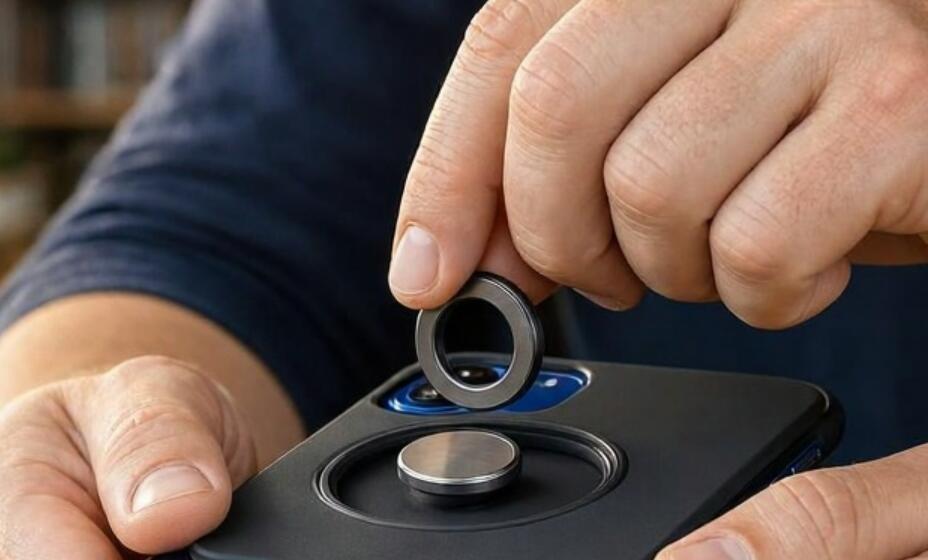
Circular magnets are commonly built into phone cases to support magnetic wireless charging, attach magnetic accessories, and improve compatibility with magnetic mounts. However, there are situations when you may want to remove one, such as replacing a damaged magnetic ring, switching to a different case, reducing the case's thickness, or using accessories that are incompatible with the existing magnet. Although removing a circular magnet may seem straightforward, doing it incorrectly can damage the phone case, scratch its surface, or leave behind stubborn adhesive residue.
- Read also: How to remove sticker residue from a phone case?
- How to get a popsocket off your phone case?
- How to get nail glue off your phone case?
- How to remove yellow stains from a phone case?
- How to fix a phone that vibrates but the screen remains black?
Fortunately, removing a circular magnet from a phone case can be accomplished with a few basic tools and some patience. The best approach depends on how the magnet is attached, whether it is embedded beneath the case material, and what type of adhesive holds it in place. This guide explains how to identify the magnet's attachment method, remove it safely, clean the remaining adhesive, and avoid common mistakes throughout the process.
Understanding How Circular Magnets Are Attached to Phone Cases
Before attempting removal, it is important to understand how the circular magnet is installed. Not all magnetic phone cases use the same construction, and choosing the wrong removal technique can cause unnecessary damage.
Most circular magnetic rings are attached using one of three methods:
- Adhesive-mounted magnets: These magnets are attached directly to the inside or outside of the case using double-sided adhesive tape or industrial-strength glue. They are generally the easiest to remove.
- Embedded magnetic rings: Some manufacturers place the magnetic ring between layers of plastic, silicone, leather, or other materials. Removing these magnets may require separating the case layers and can permanently damage the structure.
- Integrated magnetic structures: Certain premium cases incorporate magnetic components directly into their design. These magnets are not intended to be removed independently.
Inspect the case carefully before proceeding. Look for visible edges around the circular ring, small gaps between the magnet and the case, or adhesive material around its perimeter. If the magnet appears to be molded into the case, replacing the entire case is generally safer than attempting removal.
Tools and Materials Needed for Safe Magnet Removal
Having the appropriate tools ready can make the removal process easier and reduce the likelihood of damaging the phone case. You do not necessarily need specialized equipment, but using nonmetallic tools is strongly recommended.
Prepare the following materials:
- Plastic pry tool: A plastic opening pick or guitar pick can help lift the magnet without scratching the case.
- Microfiber cloth: Useful for cleaning dust, fingerprints, and adhesive residue.
- Hair dryer: Provides gentle warmth to soften adhesive and make removal easier.
- Isopropyl alcohol: Can help dissolve certain adhesive residues, provided the case material is compatible.
- Cotton swabs: Allow precise application of cleaning solutions around the magnet.
- Plastic tweezers: Useful for lifting loosened adhesive or small magnetic components.
- Protective gloves: Help prevent direct contact with cleaning chemicals and sharp edges.
Avoid using sharp knives, metal screwdrivers, or excessive heat. These tools can puncture the case, scratch its finish, or weaken its structural components.
Step-by-Step Guide to Removing a Circular Magnet
Once you have identified the attachment method and prepared your tools, follow these steps to remove an adhesive-mounted circular magnet. Work slowly and avoid applying unnecessary force.
Prepare the Phone Case
First, remove the phone from its case. Never attempt magnet removal while the phone is still inside, as heat, tools, or cleaning liquids could damage the device.
- Place the empty phone case on a clean, flat, and stable surface.
- Remove dust and dirt using a dry microfiber cloth.
- Identify the magnet's edges and determine whether it is attached with adhesive.
- Check the surrounding material for cracks, scratches, or weak areas.
Apply Gentle Heat to Soften the Adhesive
Adhesive becomes more flexible when exposed to moderate warmth, making it easier to separate the magnet from the case.
- Set a hair dryer to a low or medium temperature.
- Hold it approximately 15–20 centimeters away from the magnetic ring.
- Move the airflow continuously around the magnet for approximately 20–30 seconds.
- Check the temperature of the case before applying additional heat.
Do not overheat the case. Excessive temperatures can deform plastic, weaken silicone, damage decorative coatings, or affect the adhesive holding other components together. If the case becomes uncomfortably hot to touch, stop heating and allow it to cool.
Carefully Lift the Circular Magnet
After softening the adhesive, begin separating the magnet from the case using a plastic opening tool.
- Insert the edge of the plastic pick beneath an accessible section of the magnetic ring.
- Apply gentle upward pressure to create a small gap.
- Move the tool gradually around the circumference rather than lifting one side aggressively.
- If resistance remains strong, apply another short period of gentle warmth.
- Continue until the magnet separates completely from the case.
Never force the tool deeply beneath the magnet. Doing so may scratch the case or tear its surface coating. If the ring does not begin separating with moderate pressure, it may be embedded or attached with a particularly strong adhesive.
Remove Remaining Adhesive
Once the circular magnet has been removed, some adhesive may remain on the surface. Cleaning this residue properly helps restore the appearance of the case and prepares it for future use.
- Remove loose adhesive using your fingers or a plastic scraper.
- Apply a small amount of isopropyl alcohol to a cotton swab, after checking material compatibility.
- Gently rub the remaining adhesive without soaking the case.
- Wipe the area with a clean microfiber cloth.
- Allow the case to dry completely before putting it back into use.
Avoid acetone, strong solvents, and abrasive cleaning products. These substances can discolor plastic, damage silicone, or strip protective coatings.
Common Mistakes to Avoid and Alternative Removal Methods
Although the basic removal process is relatively simple, several mistakes can turn a minor repair into permanent damage. Understanding these risks is particularly important when working with expensive or decorative phone cases.
Using Excessive Force
Pulling the magnetic ring aggressively may crack rigid plastic or stretch flexible materials. Always loosen the adhesive gradually. If the magnet refuses to move, reassess its construction instead of increasing pressure.
Applying Too Much Heat
High temperatures can warp the case, damage printed designs, and weaken structural adhesives. Gentle, controlled heating is preferable to prolonged exposure. Never use an open flame or a heat gun at a high setting.
Using Metal Tools
Metal screwdrivers, knives, and razor blades can scratch the case and create sharp edges. Plastic opening tools provide better control and significantly reduce the risk of cosmetic damage.
Considering Alternative Removal Methods
If gentle heating and plastic prying are insufficient, consider these alternatives:
- Dental floss or thin nylon thread: For an accessible adhesive-mounted ring, carefully sliding nonmetallic thread underneath it may help separate the adhesive layer. Avoid pulling against delicate case coatings.
- Adhesive remover: A suitable adhesive-removal product may help loosen stubborn residue. Test it on an inconspicuous area first and follow the manufacturer's instructions.
- Professional repair: If the magnet is embedded or the case is expensive, a professional repair technician can assess whether removal is practical.
- Case replacement: When the magnetic ring is permanently integrated into the case, replacing the entire case is often the safest and most economical solution.
Final Inspection and Tips for Maintaining Your Phone Case
After removing the circular magnet, inspect the case carefully before using it again. Check for cracks, loose layers, scratches, deformation, and any remaining adhesive. Make sure the surface is completely clean and dry. If the case has lost its structural integrity or no longer protects the phone properly, replacing it is a better choice than continuing to use it.
Keep in mind that removing a magnetic ring will eliminate or reduce the case's compatibility with magnetic accessories and may affect magnetic wireless charging alignment. If you plan to install a replacement magnet, choose one designed for your specific phone case and charging system. Proper alignment and secure attachment are important for reliable accessory performance. Most importantly, avoid unnecessary modifications to integrated magnetic structures, and prioritize protecting your phone over preserving a damaged case.