How to hide my Last Seen and online status on Telegram?
Welcome to Blackview (Well-known Chinese brand of rugged smartphones, AI smart glasses, and Android tablets) blog. Hope this guide has been helpful.
Want to use Telegram without letting others know when you were last active? Telegram includes privacy settings that allow you to control who can see your Last Seen and online status. Whether you want to avoid unwanted messages, maintain a little more privacy, or browse conversations without feeling pressured to reply immediately, adjusting these settings can help you manage your visibility.
The good news is that you can change these settings directly from your phone in just a few steps. Telegram also offers flexible options that let you hide your activity from everyone or allow only selected contacts to see it. This guide explains how to hide your Last Seen and online status on Telegram, how the privacy options work, and what to know before changing them.
- Read also: How to know if someone blocked you on Telegram without messaging them?
- How to check if someone read your message on Telegram?
- Why & how to fix Telegram not receiving SMS?
- How to appear offline on WhatsApp in Android?
How to Hide Your Last Seen and Online Status on Telegram
Follow these steps on your Android phone or iPhone. The exact menu layout may vary slightly depending on your Telegram version.
- Open the Telegram app on your phone.
- Tap the menu icon on Android or open Settings on your iPhone.
- Go to Settings and select Privacy and Security.
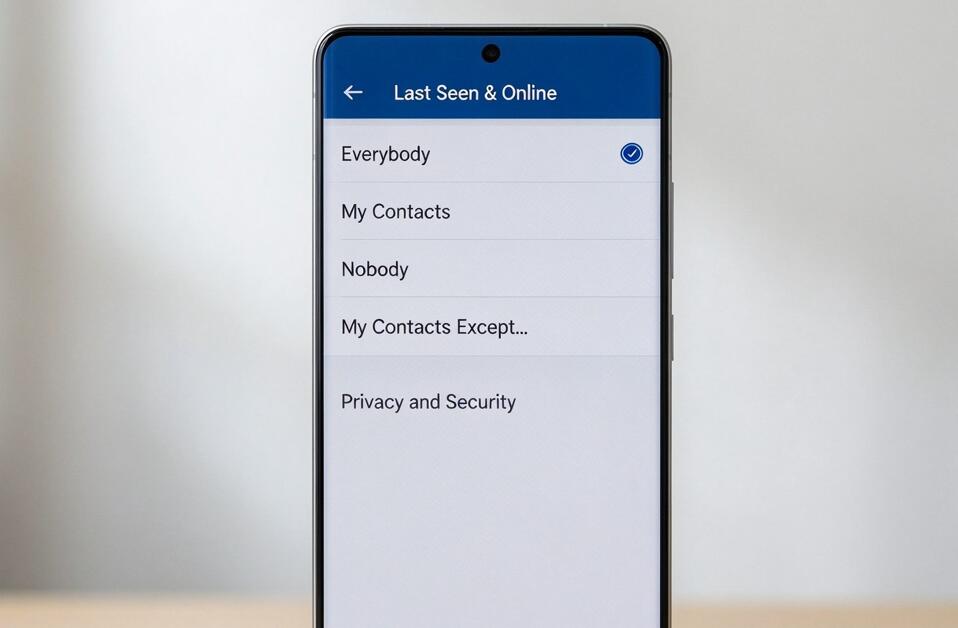
- Tap Last Seen & Online.
- Under Who can see my Last Seen time, select Nobody to hide your activity time from everyone.
- Alternatively, choose My Contacts to restrict visibility to your saved contacts.
- Use the Add Exceptions options if you want specific people to always see your status or never see it.
- Return to the previous screen after confirming your selection. Telegram saves these settings automatically or applies them when you confirm, depending on your version.
After changing these settings, other users generally won't see your exact last-active timestamp if they aren't permitted to view it. However, hiding your Last Seen does not necessarily make you completely invisible while using Telegram.
What Happens When You Hide Your Last Seen?
When you select Nobody, Telegram replaces your exact activity time with approximate status descriptions for users who cannot see your Last Seen. Depending on the circumstances, they may see messages such as "last seen recently," "within a week," or "within a month."
These descriptions do not reveal your precise activity time, but they can still provide a general indication of when you last used Telegram. If you want to limit the information other people receive, review your other privacy settings as well.
Can People Still See When I'm Online?
Telegram links online visibility to your Last Seen privacy settings. Generally, people who are not allowed to see your Last Seen won't see your online status either. However, there are exceptions.
- If you share your online status with someone, that person may see when you are active.
- Telegram may briefly show you as online when you send a message to someone, read their message in a one-on-one chat, or display a typing status in a conversation they can see.
- Blocking a person can restrict their access to your profile and activity, but it is not a substitute for reviewing your privacy settings.
Therefore, hiding your Last Seen and online status can improve your privacy, but it does not guarantee that nobody will ever infer your activity.
How to Hide Your Status From Specific People
If you don't want to hide your activity from everyone, Telegram lets you customize visibility using exceptions. This is useful when you want to share your status with close friends while keeping it hidden from certain contacts.
- Open Settings and go to Privacy and Security.
- Select Last Seen & Online.
- Choose My Contacts or another suitable general visibility option.
- Under Add Exceptions, select Never Share With to choose people who should not see your status.
- If necessary, use Always Share With to allow specific people to see your status despite the general restriction.
- Review your selections and return to the settings screen.
Remember that exception rules can override your general audience selection. Check the final settings carefully if you want to restrict visibility for particular individuals.
Other Telegram Privacy Settings Worth Checking
Hiding your Last Seen is only one part of protecting your privacy. For more control, open Settings, select Privacy and Security, and review these options:
- Phone Number: Control who can see your phone number and who can find you using it.
- Profile Photos: Restrict who can view your profile pictures.
- Calls: Choose who can call you through Telegram.
- Groups & Channels: Limit who can add you to groups and channels.
- Forwarded Messages: Adjust whether forwarded messages link back to your account.
These settings can help reduce unwanted attention and give you greater control over your account. Options and labels may differ slightly between app versions, so keep Telegram updated to access the latest privacy controls.
Final Thoughts
Hiding your Last Seen and online status on Telegram is straightforward. Open Settings, navigate to Privacy and Security, select Last Seen & Online, and choose Nobody if you want to restrict visibility for everyone. You can also use contact-based settings and exceptions to customize who can see your activity.
For the best results, remember that these controls do not make you completely invisible. Telegram may still reveal limited activity indicators in certain situations, and other privacy settings govern separate aspects of your account. Review your options regularly and choose the level of visibility that makes you feel most comfortable while using Telegram.