How to archived and unarchive someone on WhatsApp on Android/iPhone?
Welcome to Blackview (World's well-known brand of rugged smartphones, AI smart glasses, and tablets) blog. Hope this guide has been helpful.
WhatsApp does not provide a feature that literally “archives someone” as a contact. Instead, you can archive a chat, which removes that conversation from your main Chats list without deleting the messages. This is useful when you want to keep a conversation but reduce clutter or temporarily move it out of sight.
Archiving a chat is different from deleting it or blocking the person. The other person is not notified that you archived the conversation, and they can still send you messages unless you separately block or restrict them. The steps are similar on Android and iPhone, although the buttons may appear in slightly different places depending on your WhatsApp version.
- Read also: How to know if someone archived you on WhatsApp?
- How to know if someone muted you on WhatsApp?
- How to record WhatsApp video call with audio?
- How to recover deleted WhatsApp chat?
How to archive someone on WhatsApp
If your goal is to move an individual conversation out of the main WhatsApp chat list, follow these steps:
- Open WhatsApp on your phone.
- Go to the Chats tab.
- Find the conversation with the person you want to archive.
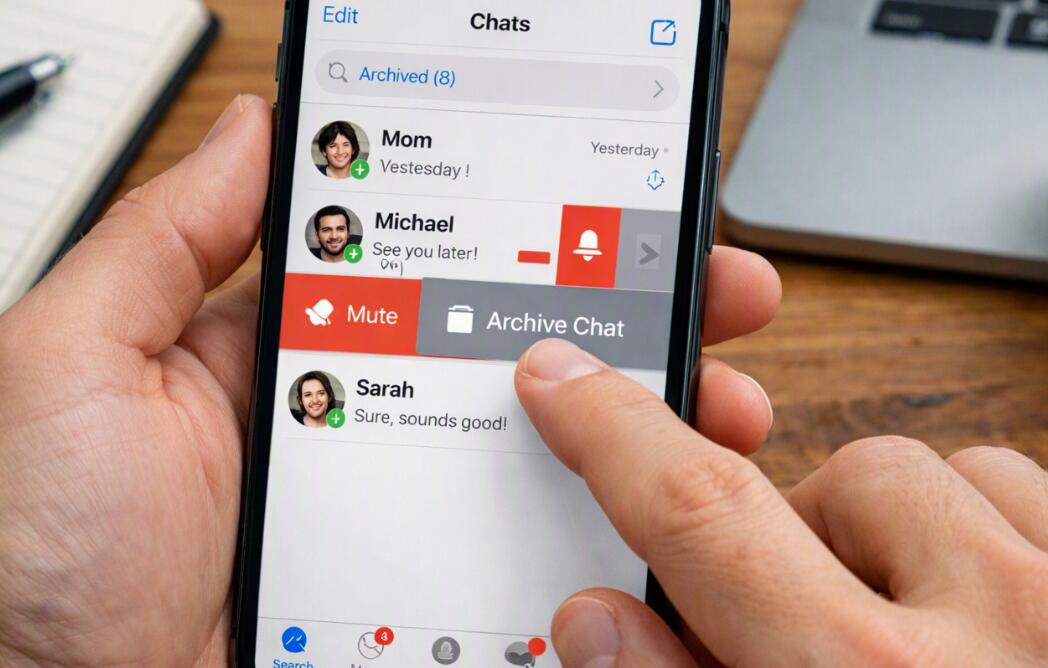
- On Android, press and hold the chat until the action toolbar appears, then tap the Archive icon.
- On iPhone, swipe left on the conversation and tap Archive.
- The conversation will be moved to the Archived section instead of appearing in your regular chat list.
After you archive the chat, the conversation itself is not erased. Your previous messages, photos, documents, and other chat content remain available unless you separately delete them. You can open the Archived section whenever you want to find the conversation again.
What happens when you archive a WhatsApp chat?
Archiving mainly changes where the conversation appears in your WhatsApp interface. It does not remove the person from your contacts, end the conversation, or prevent them from sending another message. Think of it as putting a conversation into a separate folder rather than throwing it away.
Depending on your WhatsApp settings, a new message may cause an archived conversation to return to the main Chats list. WhatsApp also provides an option that can keep chats archived even when new messages arrive. If keeping an archived conversation out of your main list is important, check your chat settings for the relevant archived-chat option.
How to find an archived chat
Archived conversations remain accessible after you move them out of the main chat list. To locate one, open WhatsApp and look for the Archived section in the Chats area. Tap it to see the conversations you have previously archived.
If you cannot immediately find the Archived section, use WhatsApp's search function to search for the person's name or a word from the conversation. WhatsApp's interface can change between app versions, so the exact location of the archive controls may vary.
How to unarchive a WhatsApp chat
You can restore an archived conversation whenever you want. Unarchiving does not delete or modify the messages; it simply returns the chat to your normal conversation list.
- Open WhatsApp.
- Open the Archived section.
- Find the conversation you want to restore.
- On Android, press and hold the chat and select the Unarchive option.
- On iPhone, swipe left on the archived conversation and choose Unarchive.
- Return to the Chats list and confirm that the conversation has been restored.
The conversation should now appear alongside your other active chats. If you want to archive it again later, you can repeat the archive process.
Archive vs. delete vs. block on WhatsApp
These three actions serve very different purposes. Archive hides a conversation from the main chat list while keeping the conversation available. Delete removes the chat from your own WhatsApp interface, although deleting a chat does not necessarily delete the conversation from the other person's phone. Block is a communication-control feature that prevents the blocked contact from contacting you through WhatsApp in the normal way.
Choose the action according to what you actually want to accomplish. If you simply want a cleaner Chats screen, archiving is sufficient. If you want to remove old messages from your own account, consider deleting the relevant chat after checking whether you need its contents. If you no longer want to receive communications from a particular contact, blocking is a separate option.
Does the other person know you archived them?
WhatsApp does not send a notification telling someone that you archived their chat. From the other person's perspective, the conversation continues normally. They can generally continue sending messages to you, and archiving does not change their contact status.
Because archiving is primarily an organizational feature, it should not be confused with privacy controls. If your intention is to prevent someone from contacting you, hiding their chat is not enough; you would need to use WhatsApp's available communication and privacy controls instead.
Tips for managing archived WhatsApp conversations
Archiving can be particularly useful if you have many inactive conversations, group chats, shopping confirmations, work discussions, or old conversations that you want to keep without seeing them every time you open WhatsApp.
- Archive inactive conversations to keep the main Chats list organized.
- Review the Archived section periodically so important conversations are not overlooked.
- Use WhatsApp's notification and privacy settings when you need more control than archiving provides.
- Back up important conversations and media before performing major cleanup or deleting chats.
Final thoughts
To “archive someone” on WhatsApp, you actually archive the chat you have with that person. The process is quick: locate the conversation, choose Archive, and access it later through the Archived section. The action does not delete your messages and does not notify the other person that you moved the conversation.
For simple organization, archiving is a convenient way to keep your main WhatsApp screen less crowded while preserving access to older conversations. If your goal involves deleting information, stopping messages, or improving privacy, however, use the corresponding WhatsApp feature rather than relying on archiving alone.