The 6 good free Christmas makeup filter apps (Android/iPhone) that are worth trying
Welcome to Blackview (Well-known brand of AI smart glasses, rugged smartphones and Android tablets) blog. Hope this guide has been helpful.
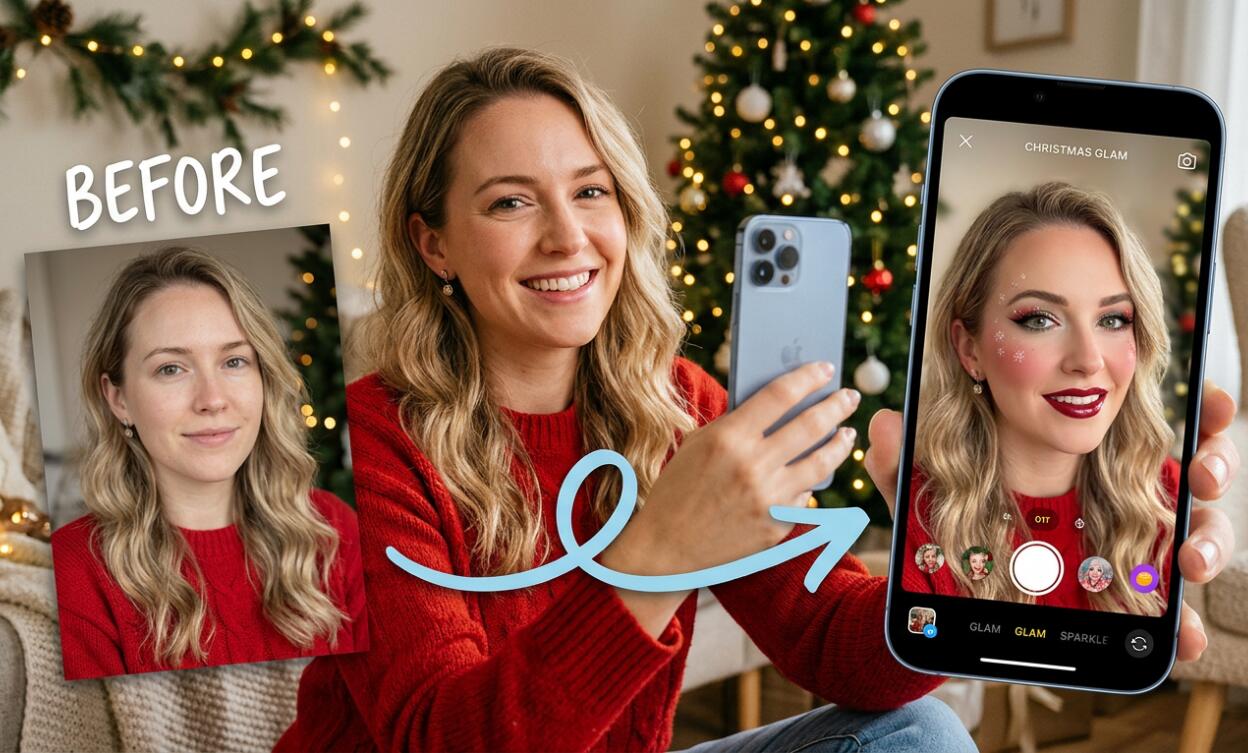
Christmas is the perfect excuse to add a little extra sparkle to your beauty routine. Whether you're getting ready for a cosy Christmas Eve dinner, planning a glamorous holiday party look, or simply hoping to capture a few adorable festive selfies, the right makeup filter app can make the experience even more enjoyable. From shimmering champagne eyeshadow and classic Christmas-red lipstick to rosy cheeks, frosted highlights, and playful snowflake effects, there are plenty of ways to give your photos a seasonal makeover without buying an entirely new makeup collection.
- Read also: The 5 best apps with Ghost Filter for making Halloween videos
- The 5 best free palm reader apps
- 6 best free AI hairstyle apps for women (Android/iOS)
- The 7 best free AI hairstyle apps for men
- The 6 best free body slim photo editor apps (Android/iOS)
The lovely thing about Christmas makeup filter apps is that you don't need professional photography skills or an extensive cosmetics collection to experiment. With just your Android phone or iPhone, you can try different beauty looks, adjust virtual makeup, and add charming holiday details to ordinary selfies. Some apps specialise in realistic virtual makeup, while others offer playful augmented-reality effects and festive camera filters. Here are six free-to-download options worth exploring.
The 6 Christmas Makeup Filter Apps List
- Snapchat – Best for fun Christmas AR lenses.
- BeautyPlus – Best for glamorous holiday portraits.
- B612 – Best for playful Christmas camera effects.
- SNOW – Best for cute seasonal selfies.
- Perfect365 – Best for complete Christmas makeup looks.
- YouCam Makeup – Best for realistic virtual Christmas makeup.
1. Snapchat – Best for Fun Christmas AR Lenses
Snapchat is a wonderful choice if you enjoy playful beauty effects and festive transformations. Its camera offers augmented-reality lenses that can change your appearance in real time. During the Christmas season, you can explore effects featuring snowflakes, sparkling lights, Santa-inspired accessories, reindeer details, and holiday-themed makeup.
The Lens Explorer is particularly useful because it offers creations from different users and creators. Depending on availability, you might discover rosy winter cheeks, glittery eyelids, bright red lips, or whimsical Christmas character transformations.
- Real-time Christmas-themed AR face filters.
- Festive makeup effects and animated decorations.
- Selfie photography and short-video recording.
- Creative lenses from the Snapchat community.
- Easy sharing with friends and family.
Snapchat is free to download on Android and iOS, and many lenses are available without payment. However, particular lenses may disappear or change over time. It is best for spontaneous holiday fun rather than detailed makeup customisation.
2. BeautyPlus – Best for Glamorous Holiday Portraits
BeautyPlus is a lovely option when you want your Christmas photos to look polished, bright, and ready to share. It combines selfie photography, beauty retouching, makeup tools, filters, and creative stickers in one convenient application.
Imagine taking a picture beside your Christmas tree, with warm fairy lights in the background. You can gently brighten the image, enhance your lipstick, soften the overall appearance, and add a little festive sparkle. Its editing tools are particularly helpful when the lighting isn't quite as flattering as you hoped.
- Virtual makeup and beauty filters.
- Skin retouching and automatic beautification.
- Creative stickers and decorative effects.
- Background editing and photo enhancement.
- Photo and video editing tools.
BeautyPlus is available for Android and iOS as a free download with optional in-app purchases. Some exclusive filters, templates, and advanced features are reserved for premium users.
For a sophisticated Christmas portrait, I recommend keeping the retouching subtle. A natural-looking complexion, warm blush, and beautiful red lipstick can be much more charming than an overly edited image.
3. B612 – Best for Playful Christmas Camera Effects
B612 is particularly appealing if you enjoy experimenting with filters while taking pictures rather than editing everything afterwards. Its beauty camera includes real-time effects, AR stickers, and makeup-inspired enhancements, making it a convenient companion for spontaneous Christmas photos.
You can try different beauty settings, experiment with eye and lip effects, and browse seasonal decorations when available. Think cute snow-covered selfies, rosy cheeks, sparkling eyes, and cheerful holiday accessories.
- Live beauty filters and AR makeup effects.
- Customisable facial enhancement.
- Creative stickers and seasonal camera effects.
- Photo and video capture.
- Additional editing tools for colours and lighting.
B612 is available on both Android and iOS, with free features and optional VIP upgrades. Its seasonal content changes regularly, so you may find more Christmas-inspired effects during December than at other times of the year.
This is a particularly nice option for friends who want to take matching festive selfies or create a collection of cheerful holiday memories.
4. SNOW – Best for Cute Seasonal Selfies
For those who love soft, dreamy, and slightly whimsical beauty effects, SNOW is another application worth exploring. It combines beauty camera features with animated stickers, filters, and AR effects, creating plenty of opportunities for playful Christmas photography.
Its appeal lies in the variety of visual styles. You can aim for a gentle, natural-looking selfie or embrace something more imaginative with animated decorations and cute facial effects. During the festive season, look out for winter-inspired filters, sparkling overlays, and Christmas-themed accessories.
- Real-time beauty camera effects.
- AR stickers and animated facial decorations.
- Makeup-inspired filters and portrait enhancements.
- Creative photo and video capture.
- Seasonal effects and decorative elements when available.
SNOW is available for Android and iOS. It offers free features alongside optional paid content, although the selection may differ depending on your location and app version.
If you prefer a sweet, youthful Christmas aesthetic over a dramatic party look, SNOW is a fun app to have on your phone.
5. Perfect365 – Best for Complete Christmas Makeup Looks
Perfect365 is a particularly good option for anyone who wants to explore makeup combinations rather than simply add a festive filter. It focuses on virtual beauty transformations, allowing you to experiment with different cosmetic styles and see how they work together on your face.
For Christmas, you could try a classic combination of red lipstick, softly sculpted cheeks, defined lashes, and shimmering eyeshadow. Alternatively, create a more understated winter look with nude lips, rosy blush, and a subtle highlight.
- Virtual makeup applications and complete beauty looks.
- Lipstick, eyeshadow, blush, and other cosmetic effects.
- Skin enhancement and facial retouching.
- Beauty presets and makeup inspiration.
- Photo editing and sharing options.
Perfect365 is free to download, with additional in-app purchases. It is available on Android and iOS, although individual features and subscription options may vary.
What makes this app stand out is its makeup-focused approach. If you're searching for inspiration for your real Christmas party makeup, it can also be a useful digital beauty playground.
6. YouCam Makeup – Best for Realistic Christmas Makeup
YouCam Makeup is a wonderful starting point if you want to experiment with a Christmas beauty look before deciding how to wear your actual makeup. Rather than simply placing decorations over your face, the app offers virtual makeup tools that let you try lipstick, foundation, blush, eyeshadow, eyeliner, and other beauty details.
For a traditional Christmas look, try a rich berry or classic red lip paired with softly defined eyes. If you're attending a glamorous evening celebration, experiment with champagne shimmer, delicate eyeliner, and a little extra blush. The virtual try-on experience makes it easy to compare different combinations without having to remove and reapply real makeup.
- Real-time virtual makeup and beauty camera.
- Different lipstick shades, eyeshadows, blushes, and foundation effects.
- AI-powered facial enhancement and skin retouching.
- Hairstyle and hair-colour experimentation.
- Photo and video editing options.
Available for Android and iOS, YouCam Makeup is free to download, although some advanced tools and makeup collections require a paid subscription. Its biggest advantage is the level of control it offers. You can create a look that feels elegant and wearable rather than relying entirely on exaggerated holiday effects.
How to Choose the Right Christmas Makeup Filter App
With six lovely options available, choosing the right app depends on the kind of Christmas photos you want to create. Before downloading several applications, consider whether you prefer realistic makeup, playful face transformations, or decorative winter effects.
- For realistic makeup: Choose YouCam Makeup or Perfect365.
- For festive entertainment: Snapchat is excellent for interactive Christmas lenses.
- For polished portraits: BeautyPlus offers convenient beauty and photo-editing tools.
- For creative camera effects: Try B612 or SNOW for real-time filters and seasonal decorations.
Also consider how you intend to use your pictures. If you're creating a Christmas greeting card, a beautifully edited portrait may be ideal. If you're sharing funny videos with friends, animated AR effects might be much more enjoyable.
Christmas Makeup Looks Worth Trying
One of the nicest things about virtual makeup is that you can experiment with styles you might not normally wear. Christmas is the perfect opportunity to step outside your everyday beauty routine.
- Classic Christmas glamour: Pair bold red lipstick with softly defined eyes, rosy cheeks, and a luminous complexion.
- Winter wonderland: Experiment with cool pink blush, silvery eyeshadow, frosted highlights, and delicate snowflake effects.
- Golden holiday glow: Try champagne or gold eyeshadow, warm bronzer, glossy nude lipstick, and subtle shimmer.
- Festive candy-inspired beauty: Play with berry lipstick, rosy eye makeup, sparkling decorations, and playful Christmas stickers.
You don't need to use every effect at once. Sometimes a simple makeup transformation combined with warm Christmas lighting creates the most beautiful result.
Tips for Getting the Best Results from Christmas Makeup Filters
Even the best beauty application cannot completely compensate for poor lighting or an awkward camera angle. A few small adjustments can make your holiday photographs look considerably better.
- Find natural lighting: Stand near a window during the day or use soft lighting indoors.
- Keep your face clearly visible: Most AR makeup filters work better when your face is not covered by hair, hats, or accessories.
- Adjust the intensity: Reduce excessive skin smoothing and makeup saturation if you want a more natural appearance.
- Experiment with angles: Take several photographs from slightly different positions to find your most flattering composition.
- Match your background: Christmas trees, fairy lights, candles, and neutral winter decorations can make your festive portrait feel more atmospheric.
- Save different versions: Keep both your original photograph and edited version so you can compare them later.
My favourite approach is to use one or two makeup effects and let the Christmas atmosphere do the rest. A little sparkle is wonderful, but your natural expression should remain the star of the photograph.
Are Free Christmas Makeup Filter Apps Really Free?
Yes, all six applications can be downloaded without an upfront purchase. However, free download does not necessarily mean that every feature is available at no cost.
Most beauty applications follow a freemium model. This means you can use selected filters, makeup effects, and editing tools for free, while certain exclusive collections or advanced AI features require a subscription or individual purchase.
For example, YouCam Makeup offers free virtual makeup tools alongside premium beauty collections. BeautyPlus also provides free editing features, while some exclusive templates and filters require payment. B612 and SNOW similarly combine free camera effects with optional VIP content.
Snapchat is particularly appealing if you want to explore community-created lenses without purchasing a dedicated beauty subscription.
A useful tip is to explore the free collection before starting any trial. Check whether the effects you actually want are included, and pay attention to automatic subscription renewal terms. You can enjoy a lovely Christmas makeover without spending anything.
Privacy and Safety When Using Makeup Filter Apps
Beauty applications often need access to your camera and photo library to provide their main features. Before granting permissions, take a moment to check what information the app collects and how your pictures may be used.
- Download applications from the official Google Play Store or Apple App Store.
- Read the privacy policy and the app's data safety information.
- Grant camera and photo permissions only when necessary.
- Avoid uploading private or sensitive photographs to unfamiliar AI editing services.
- Check whether your images are stored online or used for additional processing.
- Review social-sharing settings before publishing edited photographs.
Remember that privacy practices can differ between applications and change with updates. The most important thing is to enjoy experimenting while remaining comfortable with how your personal photographs are handled.
Frequently Asked Questions (FAQ)
Which is the best free Christmas makeup filter app overall?
YouCam Makeup is my first recommendation for realistic virtual makeup experimentation. However, Snapchat is an excellent alternative if you prefer fun Christmas-themed AR lenses rather than detailed cosmetic adjustments.
Can I use these apps on both Android and iPhone?
Yes. All six applications have Android and iOS availability. However, individual features, compatibility, and subscription options may vary depending on your device and country. Read more: How to download Apps not available in your country?
Do these apps have dedicated Christmas makeup filters?
Some offer seasonal effects, while others provide general makeup tools that you can combine to create a Christmas-inspired look. Seasonal collections are not necessarily available throughout the year.
Can I apply Christmas makeup filters to existing photos?
Yes. Apps such as YouCam Makeup, BeautyPlus, and Perfect365 allow you to edit existing photographs. Some camera-focused effects, particularly interactive AR lenses, are designed primarily for live camera use.
Can I create Christmas makeup videos with these apps?
Yes. Snapchat, B612, SNOW, and BeautyPlus offer video-related features. You can record festive selfies, experiment with beauty effects, and create short holiday clips. The available recording and editing tools vary by application.
Do I need to subscribe to get beautiful results?
Not necessarily. The free versions offer enough basic effects and editing options to create attractive Christmas photographs. Paid subscriptions mainly provide access to additional filters, exclusive collections, and advanced editing features.
When is the best time to look for Christmas filters?
Late November and December are good times to explore seasonal collections. Developers and creators often introduce holiday-inspired effects around this period. However, availability can change, so it is worth checking the apps regularly.
Final Thoughts
Finding the right Christmas makeup filter app doesn't have to be complicated. Whether you choose Snapchat for its playful festive lenses, BeautyPlus for beautifully polished portraits, or Perfect365 for complete makeup combinations, each application offers a different way to celebrate the season. B612 and SNOW are lovely choices for spontaneous selfies, while YouCam Makeup is particularly useful for realistic virtual makeup experimentation. The best choice is ultimately the one that makes you feel creative, confident, and happy.
And remember, Christmas beauty isn't about achieving a flawless digital appearance. It's about enjoying the little moments, laughing with loved ones, capturing happy memories, and adding a touch of sparkle to the celebrations. Try a few different looks, save your favourite photographs, and perhaps create a festive selfie collection to look back on in the years ahead. After all, the most beautiful Christmas pictures are the ones that capture the warmth and happiness of the season.