How do I control the power of a smart socket using a smartphone?
Welcome to Blackview blog. Hope the guide helps.
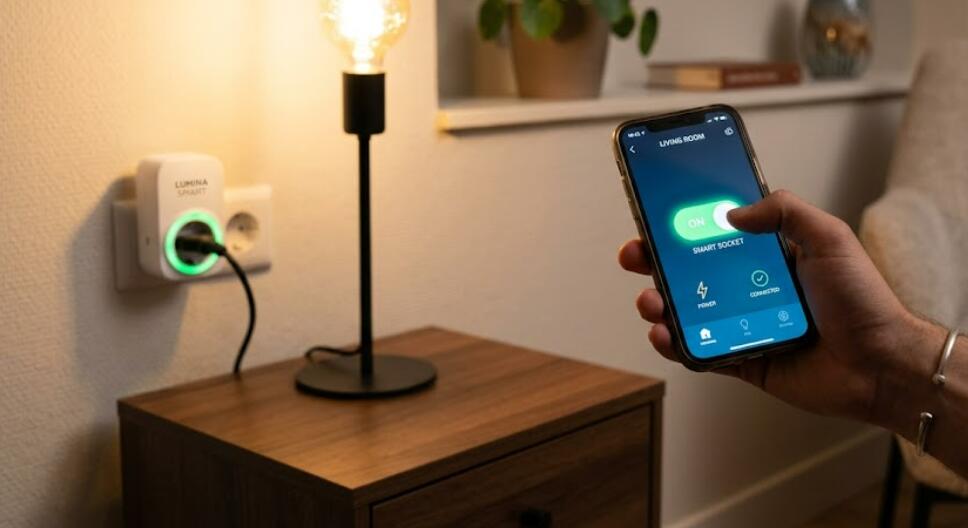
Smart sockets have become one of the easiest ways to make a home smarter without replacing existing appliances. By connecting a lamp, fan, coffee maker, or other electrical device to a smart socket, users can remotely turn the power on or off using a smartphone. This convenient technology helps improve energy efficiency, enhances home automation, and allows users to manage household devices from virtually anywhere with an internet connection.
- Read also: How to connect smart lock to phone?
- How to control air conditioner with a phone?
- How to use phone as remote for smart TV without app?
Whether you are at home, at work, or traveling, controlling a smart socket through a smartphone is usually simple once the device has been properly configured. Most smart sockets connect through Wi-Fi or Bluetooth and work with dedicated mobile applications. Many models also support voice assistants and automation features, making it even easier to schedule appliances or control them with a single tap. This guide explains the complete process, useful features, and common troubleshooting tips.
Set Up the Smart Socket
The first step is pairing the smart socket with your smartphone. The setup process is generally straightforward and only takes a few minutes.
Steps to Connect the Smart Socket
Follow these steps to complete the initial configuration.
- Plug the smart socket into a powered wall outlet.
- Download the official smart socket app from the App Store or Google Play Store.
- Create an account or sign in if required.
- Enable Wi-Fi and Bluetooth on your smartphone if the setup process requests it.
- Place the smart socket into pairing mode by pressing and holding its power button.
- Open the mobile app and choose the option to add a new device.
- Select your smart socket from the available devices.
- Enter your Wi-Fi password when prompted.
- Wait for the app to complete the connection process.
- Assign a recognizable name such as "Living Room Lamp" or "Coffee Maker."
Control the Power Using Your Smartphone
Once the smart socket has been connected successfully, you can easily control its power through the mobile application.
Steps to Turn the Socket On or Off
The control process is quick and user-friendly.
- Open the smart socket application.
- Select the connected smart socket from your device list.
- Tap the power button displayed on the screen.
- Wait a few seconds for the command to reach the socket.
- Verify that the connected appliance turns on or off.
- Repeat the process whenever you want to change the power state.
Use Scheduling and Automation Features
Many smart sockets include automation tools that reduce manual operation and improve convenience.
Scheduling Power Control
You can create daily or weekly schedules to automatically power connected devices on or off at specific times. For example, a lamp can turn on every evening, or a coffee maker can start before you wake up.
Timer Functions
Built-in countdown timers allow appliances to switch off automatically after a selected period, helping reduce unnecessary electricity usage.
Remote Access
If your smart socket supports cloud connectivity, you can control it even when you are away from home using your smartphone and an internet connection.
Common Troubleshooting Tips
If your smartphone cannot control the smart socket, several simple checks may solve the problem.
- Confirm the smart socket is connected to the correct Wi-Fi network.
- Restart both the smart socket and your smartphone.
- Check that your internet connection is working properly.
- Update the mobile app to the latest version.
- Verify that the smart socket firmware is up to date.
- Reconnect the socket through the app if the device becomes unresponsive.
Benefits of Smartphone Power Control
Using a smartphone to manage a smart socket offers several practical advantages for everyday life.
Greater Convenience
You can control appliances without walking to the power outlet, making daily routines easier and more comfortable.
Energy Savings
Automatically turning off unused devices helps reduce electricity consumption and lowers energy costs over time.
Improved Home Management
Smart sockets make it easier to monitor and manage multiple appliances from a single mobile application, even when you are away from home.
Controlling the power of a smart socket with a smartphone is a simple yet highly effective way to improve convenience and efficiency in any home. After completing the initial setup, you can switch appliances on or off, create schedules, and automate daily routines directly from your mobile device.
With reliable Wi-Fi, a compatible smart socket, and the official mobile application, managing household electronics becomes faster and more flexible.