How do I set a preset timer for the rice cooker using my phone?
Welcome to Blackview (World's well-known brand of waterproof & rugged phone) blog. Hope the guide helps.
Smart home appliances have made everyday cooking more convenient than ever, and smart rice cookers are a great example of this innovation. Many modern rice cookers can connect to a smartphone through Wi-Fi or Bluetooth, allowing users to control cooking functions remotely. One of the most useful features is the preset timer, which lets you schedule the cooking process in advance so your rice is freshly prepared exactly when you need it.
- Read also: How to control air conditioner with your phone?
- How to control smart lights with phone?
- How can I use my phone as a TV remote?
Whether you are preparing breakfast before waking up or planning dinner after work, setting a preset timer from your phone can save time and simplify your daily routine. Although the exact interface varies between manufacturers, the overall setup process is very similar. This guide explains how to connect your rice cooker, configure the preset timer, troubleshoot common issues, and use the feature effectively.
Before scheduling a cooking cycle, make sure your smart rice cooker is plugged in, connected to your home Wi-Fi or paired through Bluetooth if supported, and added to the manufacturer's mobile application. It is also recommended to measure the rice and water before setting the timer so the cooker can begin automatically at the scheduled time.
Prepare Your Rice Cooker and Smartphone
Before using the preset timer, confirm that both the rice cooker and your smartphone are properly configured. Completing these preparations helps ensure the scheduled cooking starts without interruption.
- Place the desired amount of rice into the inner cooking pot.
- Add the correct amount of water according to the rice type.
- Insert the cooking pot securely into the rice cooker.
- Close and lock the lid completely.
- Connect the rice cooker to a power source.
- Open the manufacturer's mobile app on your smartphone.
- Verify that the rice cooker appears as an online device.
Set the Preset Timer Using Your Phone
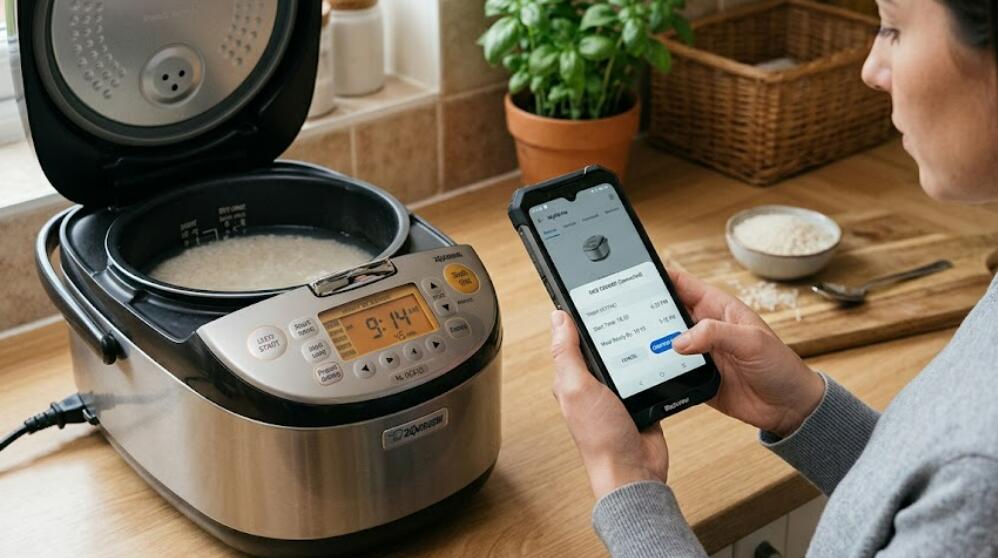
Once your rice cooker is connected, you can schedule the cooking process directly from the mobile application. Most smart rice cooker apps provide a simple timer interface that only requires a few steps.
- Launch the smart rice cooker app.
- Select your connected rice cooker from the device list.
- Choose the appropriate cooking mode, such as White Rice, Brown Rice, or Porridge.
- Tap the Preset, Reservation, or Timer option.
- Select the desired finish time or cooking start time, depending on your model.
- Review all cooking settings.
- Tap Confirm, Save, or Start to activate the preset timer.
- Check that the scheduled cooking time appears on both the app and the rice cooker display.
Useful Tips for Better Results
Using the preset timer correctly can improve cooking quality and help you avoid common mistakes.
Choose Fresh Ingredients
Use clean rice and fresh water before scheduling the timer. Avoid leaving highly perishable ingredients inside the cooker for long periods unless the manufacturer specifically recommends doing so.
Select the Correct Cooking Program
Different rice varieties require different cooking settings. Choosing the appropriate program helps produce better texture and consistent results.
Enable App Notifications
Many smart appliance apps can send notifications when cooking starts, finishes, or encounters an error. Keeping notifications enabled helps you monitor the cooking process remotely.
Troubleshoot Common Timer Problems
If the preset timer does not work as expected, several simple checks can usually solve the problem.
- Ensure the rice cooker remains connected to electrical power.
- Verify that the smartphone and rice cooker have a stable network connection.
- Update the mobile application to the latest version.
- Restart the rice cooker and reconnect it to the app if necessary.
- Confirm that the scheduled time was saved successfully.
- Check whether the selected cooking mode supports preset scheduling.
Benefits of Using a Preset Timer
Scheduling your rice cooker through your smartphone offers several practical advantages for busy households.
Greater Convenience
You can prepare the ingredients in advance and let the rice cooker automatically begin cooking at the scheduled time without additional manual operation.
Time Management
The preset timer allows meals to be ready when you arrive home, wake up, or finish other tasks, making daily meal planning more efficient.
Remote Control
Many smart apps let you monitor cooking progress, receive notifications, and manage appliance settings even when you are away from the kitchen.
Using your phone to set a preset timer for a smart rice cooker is a simple way to make meal preparation more organized and convenient. After connecting the appliance to its mobile app, you can schedule cooking times, select the appropriate program, and receive notifications without needing to stand beside the cooker.
With proper preparation, a stable connection, and the correct timer settings, your smart rice cooker can deliver freshly cooked rice exactly when you need it.