How to log in to two TikTok accounts on one phone?
Welcome to Blackview (World's well-known brand of rugged smartphones, including rugged phone with projector, rugged phone with eSIM, and Android 16 rugged phone, etc.) blog. Hope the guide helps.
Managing multiple TikTok accounts is becoming increasingly popular among content creators, business owners, social media marketers, and everyday users. Whether you want to separate personal videos from professional content or manage different brands, having two TikTok accounts on one smartphone can make your social media activities much easier. Fortunately, TikTok provides a built-in account-switching feature that allows users to access multiple profiles without constantly logging out.
- Read also: How to create TikTok account without phone number?
- How to send voice message on TikTok comments?
- Can I log into TikTok on two phones at the same time?
- If I log into TikTok on another device, will my drafts be deleted?
Logging in to two TikTok accounts on one phone is a relatively simple process. You only need to add your second account through the application and use the account-switching menu to move between profiles. This guide explains whether it is possible, provides detailed setup instructions, and covers account management, security, common problems, and useful tips.
Can You Log In to Two TikTok Accounts on One Phone?
Yes, you can log in to two TikTok accounts on one phone. TikTok supports adding multiple accounts to its mobile application, allowing users to switch between different profiles without logging out of their existing accounts each time.
This feature is particularly useful for people who want to maintain separate personal and professional identities. For example, you can use one account to share daily activities with friends and family while using another to publish business promotions, educational videos, or branded content.
Here are some important things to know before getting started:
- You can add multiple TikTok accounts to the same application.
- Each account should have its own login credentials or an independently configured login method.
- Your followers, messages, videos, and drafts remain associated with their respective accounts.
- You can switch between accounts without repeatedly entering your passwords.
- Some account features and limitations may vary depending on your region, application version, and TikTok policies.
Therefore, you do not need two smartphones to manage two TikTok accounts. One device and the official TikTok application are generally sufficient.
How to Log In to Two TikTok Accounts on One Phone
Adding a second TikTok account is straightforward and usually takes only a few minutes. Before beginning, make sure you have access to the login information for your second account. Follow these steps:
Step 1: Open the TikTok Application
Launch TikTok on your iPhone or Android smartphone. Make sure the application is updated to the latest available version to access the newest account management features.
If you are already logged in to your first account, there is no need to log out. You can add another account directly from your existing profile.
Step 2: Navigate to Your Profile
Tap the Profile icon in the bottom-right corner of the screen. This will open your current TikTok profile, where you can view your username, profile picture, uploaded videos, and account information.
Look for your username or the account-switching menu near the top of the profile page. The exact interface may vary depending on your application version.
Step 3: Select the Add Account Option
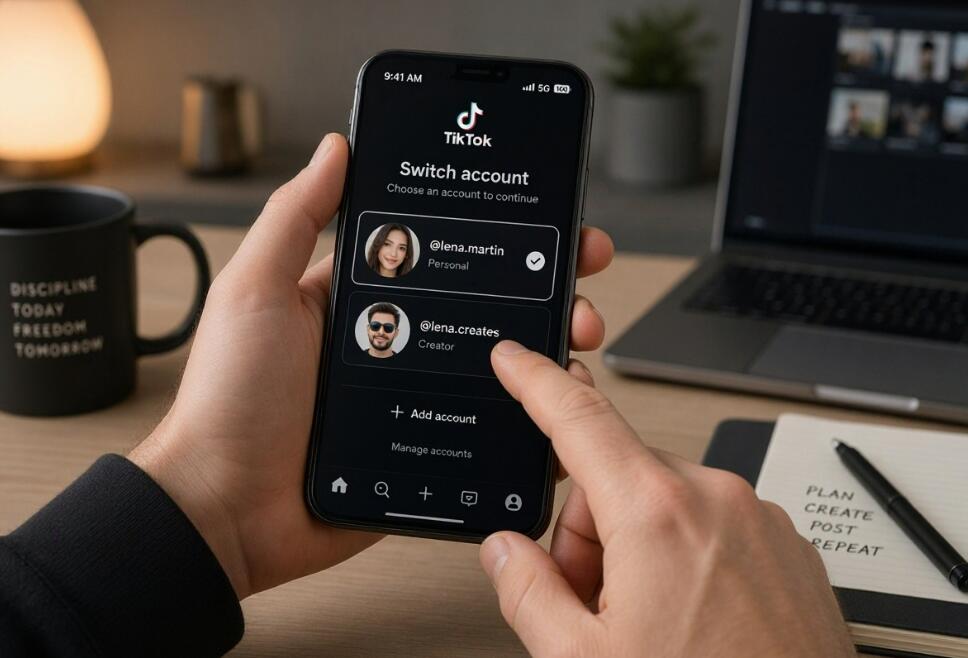
Tap your username or open the account-switching menu. Look for the Add account option and select it.
If you cannot find this option, check the account settings or Settings and privacy menu. TikTok may display slightly different navigation options on different devices.
Step 4: Log In to Your Second TikTok Account
After selecting Add account, TikTok will display a login screen. Choose the login method associated with your second account and enter the required information.
- Phone number: Enter the phone number registered to your second account and complete the verification process.
- Email address: Enter the email address and password associated with your account.
- Username: Enter your TikTok username and password if this login method is available.
- Social login: Select the supported third-party login method originally linked to your account.
Make sure you enter the correct credentials. If you use the wrong email address, phone number, or login method, TikTok may not recognize the account you want to access.
Step 5: Switch Between Your Two TikTok Accounts
Once your second account has been added successfully, you can switch between both profiles without logging out.
- Open TikTok and navigate to your Profile page.
- Tap your username or the account-switching menu.
- Find the list of accounts added to your application.
- Select the account you want to use.
- Wait for TikTok to load the selected profile.
You can repeat these steps whenever you need to switch accounts. Before publishing videos, commenting, or sending messages, always check that the correct profile is active.
How to Create a Second TikTok Account on the Same Phone
If you do not already have a second TikTok account, you can create one directly through the mobile application. Open your profile, select the Add account option, and choose the registration option instead of logging in.
Follow the on-screen instructions and provide the required registration information, including your date of birth and an available email address or phone number. Complete any verification steps and create a username and password for your new profile.
For better organization, choose usernames that clearly distinguish your accounts. For example, you could use your personal name for one account and your business or brand name for the other.
Remember that TikTok's registration requirements and age restrictions apply to every account. Make sure your registration information is accurate and that you can access the email address or phone number used for account recovery.
Can You Receive Notifications From Both TikTok Accounts?
Yes, you can manage notification preferences for multiple TikTok accounts on one smartphone. However, the notifications you receive may depend on your application version, device settings, and individual account preferences.
To review your notification settings, follow these steps:
- Open TikTok and navigate to your Profile page.
- Tap the menu icon in the upper-right corner.
- Select Settings and privacy.
- Open the Notifications section.
- Review the available notification categories and adjust your preferences.
For a business account, you may want to prioritize notifications about direct messages, comments, and account activity. For a personal account, you can disable less important notifications to reduce distractions.
Also check your smartphone's notification permissions to ensure TikTok is allowed to send alerts. If notifications are not appearing as expected, review the settings for both accounts individually.
Tips for Managing Two TikTok Accounts Efficiently
Managing two TikTok accounts on one phone is convenient, but staying organized is essential, especially if you publish content frequently. The following tips can help you avoid mistakes and maintain a consistent presence on both profiles.
- Use different profile pictures: Choose recognizable images so you can distinguish your accounts quickly.
- Keep account purposes separate: Decide what type of content belongs on each profile to avoid confusing your audiences.
- Check the active account: Confirm your username before publishing videos, replying to comments, or sending messages.
- Use strong passwords: Create unique passwords for both accounts and enable two-step verification where available.
- Organize your content: Maintain separate content calendars to plan posts and avoid uploading videos to the wrong profile.
- Review privacy settings: Check the messaging, audience, and privacy preferences of each account independently.
These habits are especially helpful for content creators and businesses that manage multiple audiences. Good organization can reduce mistakes and make daily account management more efficient.
Common Problems When Logging In to Two TikTok Accounts
Although adding multiple accounts is usually simple, you may occasionally experience login or account-switching problems. Understanding the possible causes can help you resolve them more efficiently.
Unable to Add a Second Account
If TikTok does not allow you to add another account, first check whether your application needs an update. Make sure your internet connection is stable and that you are following the correct account-switching procedure.
If the problem continues, restart the application and review TikTok's account-related restrictions and support information.
Forgotten Password or Login Information
If you cannot remember your second account's password, select the Forgot password option on the login screen. Follow the recovery instructions using the email address or phone number associated with that account.
Make sure you can access your registered recovery method before attempting to reset your password.
Accidentally Posting From the Wrong Account
This is one of the most common challenges when managing multiple TikTok profiles. Before uploading a video, check your profile picture and username to confirm that the correct account is active.
It is also helpful to prepare captions, hashtags, and video files separately for each profile so that your content remains organized.
Account Switching Is Not Working
If switching between accounts fails, check your internet connection, restart TikTok, and make sure both accounts are still available in the account menu.
Updating the application may also resolve compatibility issues. If none of these solutions works, visit TikTok's Help Center for additional troubleshooting guidance.
Is It Safe to Use Two TikTok Accounts on One Phone?
Generally, yes. Using two TikTok accounts on one smartphone is a normal way to manage different types of content. However, account security depends on how you protect your login information and use each profile.
Follow these security recommendations to protect both accounts:
- Use unique passwords for each account.
- Enable two-step verification whenever possible.
- Avoid sharing your login credentials with untrusted individuals.
- Do not click suspicious login links or provide passwords to unknown websites.
- Review the devices that have access to your accounts and remove unfamiliar sessions.
- Keep your TikTok application and smartphone operating system updated.
Another important consideration is TikTok's Community Guidelines. Having multiple accounts does not exempt users from platform rules. Avoid using additional profiles for impersonation, spam, engagement manipulation, or evading enforcement actions.
By following basic security practices and platform policies, you can manage multiple profiles while keeping your information and content better protected.
Final Thoughts
Logging in to two TikTok accounts on one phone is entirely possible and does not require complicated technical knowledge. TikTok's built-in account-switching feature makes it easy to add another profile, log in using separate credentials, and move between accounts whenever necessary. Whether you want to separate personal and professional content or manage multiple brands, this feature offers a convenient solution.
The most important things are to keep your login information secure, organize your content, and double-check which account is active before performing important actions. Once both profiles are properly configured, you can manage your TikTok presence more efficiently from a single smartphone without constantly logging out and back in.