Can you find an IP Address from a Phone Number? How to check?
Last updated: 2026-11-05
Welcome to Blackview (Well-known brand of military grade rugged smartphone) blog. Hope this "IP address tracking" related guide helps.
In today's interconnected digital world, phone numbers and IP addresses are two important pieces of information used to identify and communicate with devices and individuals online. Whether you are trying to understand how online tracking works, investigate an unknown caller, or improve your digital security, you may wonder whether it is possible to find someone's IP address using only their phone number. Although both types of information can be associated with digital communication, they serve different purposes and are not directly interchangeable.
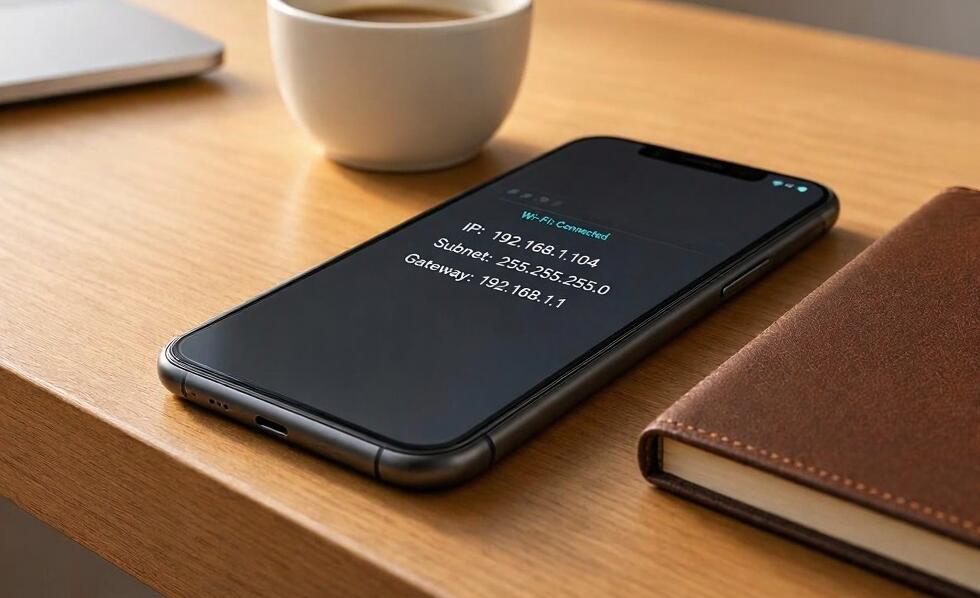
So, can you find an IP address from a phone number? The short answer is no, not directly. A phone number alone does not reveal the IP address assigned to a person's device. However, there are legitimate ways to obtain an IP address under certain circumstances, such as analyzing network connections, checking your own device information, or using authorized technical tools. This guide explains how phone numbers and IP addresses are connected, what methods actually work, and how to protect your privacy while investigating digital information.
Understanding the Relationship Between Phone Numbers and IP Addresses
Before attempting to locate an IP address, it is important to understand the difference between a phone number and an IP address.
A phone number is a unique identifier assigned to a telephone subscription or communication service. It allows people to make calls, send text messages, and use mobile communication services. An IP address, on the other hand, is a numerical identifier assigned to a device or network connection when it accesses the internet.
Although smartphones use both phone numbers and IP addresses, these identifiers are managed by different systems. Mobile carriers manage phone numbers, while internet service providers and network operators assign IP addresses.
Here are some important differences:
- Phone number: Identifies a telephone subscription or communication endpoint.
- IP address: Identifies a device or network interface for internet communication.
- Mobile network: Connects smartphones to cellular services and assigns network addresses.
- Internet service provider: Manages IP address allocation and network connectivity.
- Privacy: Both identifiers can involve personal information and are subject to privacy protections.
For example, when someone makes a phone call, the recipient can normally see the caller's phone number if caller ID is enabled. However, this does not mean the recipient can see the caller's IP address. The two systems operate independently.
Can You Find an IP Address Using Only a Phone Number?
In most situations, finding an IP address using only a phone number is technically impossible for ordinary users. There is no publicly accessible database that reliably converts a mobile phone number into its current IP address.
There are several reasons for this limitation.
Different Identification Systems
Phone numbers are managed through telecommunications networks, whereas IP addresses are assigned through internet infrastructure. A phone number does not contain information that directly identifies the IP address currently being used by a smartphone.
Dynamic IP Address Allocation
Many mobile network operators use dynamic IP addresses. This means a smartphone may receive a different IP address when reconnecting to the internet, changing networks, or starting a new session. Consequently, even previously obtained IP information may no longer be accurate.
Carrier-Grade Network Address Translation
Mobile carriers frequently use Carrier-Grade Network Address Translation (CGNAT). This technology allows multiple customers to share a public IP address. As a result, identifying one individual from a public IP address may require additional technical information, including accurate timestamps and carrier records.
Privacy and Legal Restrictions
Mobile operators generally treat subscriber information and network connection records as protected information. Access to these records is restricted and may require valid legal authorization. Websites claiming to reveal someone's exact IP address simply by entering their phone number should therefore be approached with caution.
How to Check an IP Address: Practical Methods
Although a phone number cannot directly reveal an IP address, there are several legitimate ways to check IP information depending on your purpose. The following methods are most useful when examining your own device, network, or an authorized connection.
Method 1: Check the IP Address on Your Smartphone
If you want to find the IP address associated with your own smartphone, checking its network settings is one of the easiest options.
- For Android: Open Settings, navigate to Network & Internet or Connections, select Wi-Fi, and tap the connected network to view its IP information. Menu names may vary by manufacturer.
- For iPhone: Open Settings, select Wi-Fi, tap the information icon next to your connected network, and locate the IPv4 Address section.
- Check mobile data: To see the public IP address used by your cellular connection, open a reputable IP-checking website while Wi-Fi is turned off.
- Compare connections: Check the address using both Wi-Fi and mobile data to understand how different networks assign IP addresses.
Remember that your device's private IP address and public IP address are different. The private address identifies your device within a local network, while the public address is used for communication with external internet services.
Method 2: Use an Online IP Lookup Tool
Online IP lookup services can provide basic information about an IP address, including its approximate geographical location, internet service provider, and network organization.
- Open a reputable IP-checking website.
- Allow the website to display your current public IP address.
- Copy the IP address if you need to investigate it further.
- Enter the address into an IP lookup service.
- Review the available information, such as country, region, ISP, and network details.
Keep in mind that IP geolocation is approximate. It generally cannot identify someone's exact home address, real-time physical location, or personal identity.
Method 3: Review Authorized Network Logs
If you manage a website, application, or network, server logs may contain IP addresses associated with incoming connections. These records can help administrators investigate suspicious activity, troubleshoot technical problems, and identify unusual access patterns.
- Access the administrative dashboard of your website or server.
- Locate the security, access, or connection logs.
- Identify the relevant connection using its timestamp and other available records.
- Review the associated IP address and connection details.
- Follow applicable privacy policies and data protection requirements when handling the information.
This method only works when you have legitimate access to the relevant system and its connection records. A phone number alone cannot provide these logs.
Common Myths and Risks When Searching for an IP Address
Searching for someone's IP address using a phone number can lead to misleading websites, questionable applications, and potential privacy risks. Understanding common misconceptions can help you avoid unreliable services.
Myth: Reverse Phone Lookup Reveals an IP Address
Reverse phone lookup services may provide information such as a carrier, registered region, or publicly available caller information. However, these services generally cannot reveal the current IP address assigned to the phone.
Myth: IP Tracking Websites Can Identify Anyone by Phone Number
Some websites advertise instant IP tracking using nothing more than a telephone number. Such claims are often misleading. A website cannot independently access private mobile carrier records simply because a visitor enters a phone number.
Risk: Fake Tracking Applications
Applications promising to locate a person's IP address or exact location may request unnecessary permissions, collect personal information, or install unwanted software. Before installing any tracking application, review its developer, privacy policy, permissions, and independent reputation.
Risk: Phishing and Personal Data Theft
Some suspicious websites request phone numbers, email addresses, verification codes, or payment information before supposedly revealing an IP address. Avoid sharing sensitive information with services that cannot demonstrate a legitimate purpose and trustworthy privacy practices.
How to Protect Your Phone Number and IP Address Privacy
Even though phone numbers and IP addresses are different identifiers, both can contribute to your digital footprint. Taking a few practical security measures can reduce the risk of unwanted tracking and personal information exposure.
- Limit public phone number exposure: Avoid publishing your personal number on public websites, forums, and social media profiles.
- Use strong account security: Enable two-factor authentication and use unique passwords for important accounts.
- Review application permissions: Restrict unnecessary access to your contacts, location, microphone, and other sensitive information.
- Be careful with unknown links: Do not open suspicious links received through text messages, messaging applications, or email.
- Use trusted network security tools: A reputable VPN can help conceal your public IP address from websites and services you access, although it does not make you completely anonymous.
- Keep your operating system updated: Install security updates to reduce vulnerabilities that could expose personal information.
- Contact your carrier when necessary: If you suspect SIM swapping, unauthorized account access, or phone number misuse, contact your mobile provider immediately.
These precautions can make it more difficult for malicious individuals to exploit your personal information. They also help you maintain better control over how your phone number and internet connection are used.
Conclusion
Finding an IP address directly from a phone number is not generally possible because these identifiers belong to separate telecommunications and internet systems. Although a smartphone uses both a telephone number and an IP address, knowing one does not automatically reveal the other. If you need to check an IP address, the most reliable approaches include examining your own smartphone's network settings, using reputable online IP lookup tools, and reviewing authorized server or network logs. Each method has specific limitations, particularly when it comes to identifying another person's device or physical location.
Ultimately, it is important to distinguish between legitimate IP address investigation and misleading tracking claims. Avoid websites that promise to reveal someone's exact IP address using only a phone number, and never provide sensitive personal information to unverified services. By understanding how IP addresses work, using trustworthy technical tools, and respecting privacy regulations, you can investigate network information more effectively while keeping your own digital identity secure.